


Official IRS Form W-4 PDF Template: Download, Fill & Sign Securely
Starting a new job or had a major life change? Ensuring your federal income tax withholding is accurate is essential to avoid surprises at tax time. Download our free, interactive W-4 PDF template and use KDAN PDF to streamline the process. Easily navigate through the worksheets, apply a electronic signature, and use high-level encryption to keep your Social Security Number (SSN) safe. Fast, professional, and 100% paperless.
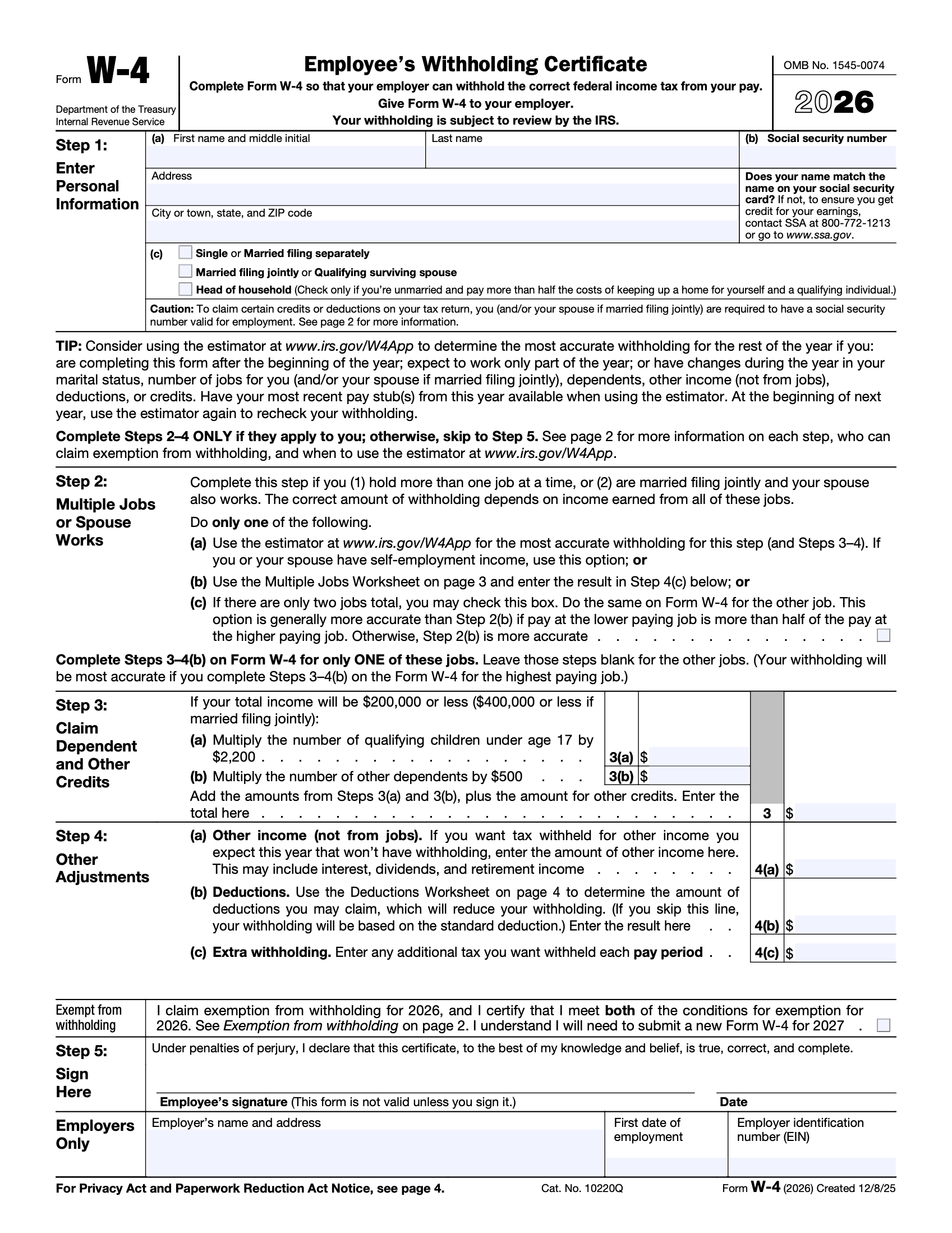
The Essential Guide to IRS Form W-4 for the 2026 Tax Year
Why Your Withholding Certificate Matters More Than Ever
Form W-4, the Employee's Withholding Certificate, is a critical document that tells your employer how much federal income tax to withhold from your paycheck. An accurately completed W-4 ensures you don’t overpay throughout the year or, conversely, end up with a large, unexpected tax bill and potential penalties when you file your tax return. Since the IRS updated the form to a five-step process, it no longer uses "allowances," making it vital to use a professional PDF editor like KDAN PDF to navigate the new worksheets and fields clearly.
Life Changes and Your Paycheck: When to File a New W-4
Ensuring Tax Accuracy After Major Milestones
You aren't required to fill out a W-4 every year, but doing so is a smart financial move if your life situation changes. Common triggers for updating your W-4 include getting married or divorced, welcoming a new child, or taking on a second job. If you’ve recently experienced these milestones, downloading our updated W-4 template and using KDAN PDF allows you to quickly adjust your withholding status, ensuring your take-home pay reflects your current financial reality without the need for manual paperwork.
Protecting Your Social Security Number and Privacy
Why Secure PDF Tools are Mandatory for Tax Forms
A W-4 contains your full Social Security Number (SSN), making it a prime target for identity theft if handled improperly. Simply emailing a filled-out PDF is a significant security risk. KDAN PDF provides enterprise-grade security features, including password protection and AES-256 encryption. By using KDAN PDF, you can securely lock your document before sending it to your HR department, ensuring that your most private information remains seen only by the intended eyes.
A Step-by-Step Walkthrough: Filling Out Your W-4 with KDAN PDF
From Basic Info to Digital Signature
Completing your W-4 digitally is the fastest way to get it to your employer. Follow these simple steps:
1. Personal Information: Open the template in KDAN PDF and type your name, address, and SSN in Step 1.
2. Multiple Jobs & Spouse Works: Use our annotation tools to help you calculate Step 2 if you have more than one job.
3. Claiming Dependents: Easily input your child tax credits and other credits in Step 3.
4. Other Adjustments: Enter additional income or deductions in Step 4 to fine-tune your withholding.
5. Sign & Date: Use KDAN PDF’s "Sign" feature to apply a professional, legally-binding electronic signature in Step 5—no printer or scanner required.
Expert Answers: Common Questions About Form W-4
Everything You Need to Know Before Submitting
Q: What is the difference between W-4 and W-2?
A: A W-4 is the form you fill out for your employer to determine tax withholding, while a W-2 is the form your employer provides to you at year-end summarizing your total earnings and taxes paid.
Q: Can I claim "Exempt" on my W-4?
A: You can only claim exemption from withholding if you had no federal income tax liability last year and expect none this year. If eligible, write "Exempt" in the space below Step 4(c).
Q: Is an electronic signature valid on a W-4?
A: Yes, the IRS allows employers to accept electronic W-4s, provided the system meets their requirements. KDAN PDF offers the professional signing tools needed to comply with these digital standards.
Q: How often can I change my W-4?
A: You can submit a new W-4 to your employer at any time. Usually, the changes will take effect within the next few pay periods.
Legal Disclaimer: This template is provided for informational purposes only and does not constitute tax, legal, or professional advice. KDAN Mobile makes no guarantees regarding the accuracy or IRS-compliance of this form. Users assume all responsibility for its use. We strongly recommend consulting with a qualified tax professional or visiting irs.gov for official guidance.

 Mac
Mac Windows
 Android


Connect with KDAN
Follow us to receive all latest updates and promotions.