


 KDAN PDF for Windows
 Lifetime License for Windows
 LynxPDF for Enterprise
 ComPDF SDK
 Edit PDF
 Add Image
 Add Hyperlink
 Annotate PDF
 Fill in PDF
 Rotate & Crop
 Rearrange PDF
 Add Pages
 Delete Pages
 Bates Numbering
 Sign PDF
 Password Protect
 Unlock PDF
 Merge PDF
 Split PDF
 Convert PDF
 OCR PDF
 Compress PDF
 Slideshow Mode
Stop Renting Your Software: 5 Signs to Cancel Adobe Acrobat in 2026
By 2026, subscription fatigue has reached a breaking point. Many people find themselves paying monthly fees for tools they barely touch—yet the charges quietly continue in the background. Adobe Acrobat is one of the most common examples: you might only need to sign a contract, merge a few pages, or make small edits, but you’re still locked into a full subscription that costs more each year.
Across student projects, freelance work, and small-business operations, the same pattern keeps appearing: users open Acrobat for a simple task, wait for it to load, navigate layers of menus, and then wonder why they’re paying premium prices for basic features. Some even keep the subscription “just in case,” despite rarely needing anything beyond straightforward PDF editing.
As budgets tighten and alternatives become more capable, more people are asking a practical question: Do I really need to rent this software every month? This article looks at why so many users are rethinking Acrobat in 2026 and highlights five clear signs that it may be time to cancel the subscription and switch to a more straightforward, cost-efficient PDF solution.
5 Signs It’s Time to Cancel Adobe Acrobat
1. Paying for features you rarely use
Many Acrobat subscribers discover that their daily tasks—signing a form, merging files, adding comments—only require a small portion of what the software offers. If you’re paying a monthly fee but only using basic tools, it’s a strong signal that the subscription no longer aligns with your actual needs.
2. Rising subscription costs
Over the years, Acrobat’s pricing has continued to increase, and users often feel the pressure of renewing a plan they don’t fully maximize. When the cost outweighs the value you receive, it makes sense to question whether the subscription is still justified.
3. Wanting simpler and faster PDF editing
Acrobat is feature-rich, but this also means a heavier interface and slower workflows. If you frequently find yourself waiting for the app to load, navigating through dense menus, or feeling overwhelmed by options you don’t use, a lighter and more intuitive PDF tool might serve you better.
4. Needing offline or multi-device access
Many users want the flexibility to edit PDFs on laptops, tablets, or phones without depending on cloud access. If Acrobat’s workflow feels too tied to a single device or requires constant online authentication, it may no longer match the mobile, multi-device habits people now rely on.
5. Preferring clear pricing and long-term ownership
Subscription models can feel unpredictable—prices change, renewal dates sneak up, and access ends the moment you stop paying. If you want a tool you can fully own, install freely, and use without ongoing fees, then a one-time-purchase PDF solution becomes far more appealing.
When Users Start Looking Beyond Acrobat
Many people don’t intentionally go searching for a new PDF tool—they simply reach a moment when Acrobat feels heavier than their actual needs. Maybe they’re opening it just to sign a form, merge a few pages, or make a quick edit, yet the software still loads slowly, asks for subscription verification, or displays features they never touch. Over time, these small frictions build up, leading users to wonder whether there’s a simpler way to handle everyday PDF tasks.
This is when lighter, more focused tools begin to stand out. Apps designed around speed, essential functions, and cleaner interfaces offer a noticeably smoother experience—especially for students, freelancers, and small teams who want to get things done without navigating through layers of menus. In this space, tools like KDAN PDF naturally attract attention because they keep the workflow straightforward: open, edit, sign, export—without the subscription overhead or learning curve.
What users gravitate toward instead:
- Lightweight PDF apps that start quickly and feel intuitive
- Tools built around essential, everyday features rather than complex menus
- Clear, one-time or flexible pricing that avoids subscription fatigue
Break Free from Subscription Fatigue
Switch to a straightforward, one-time purchase PDF solution and regain long-term ownership of your digital tools without the burden of monthly fees.
What to Look for in a PDF Tool in 2026
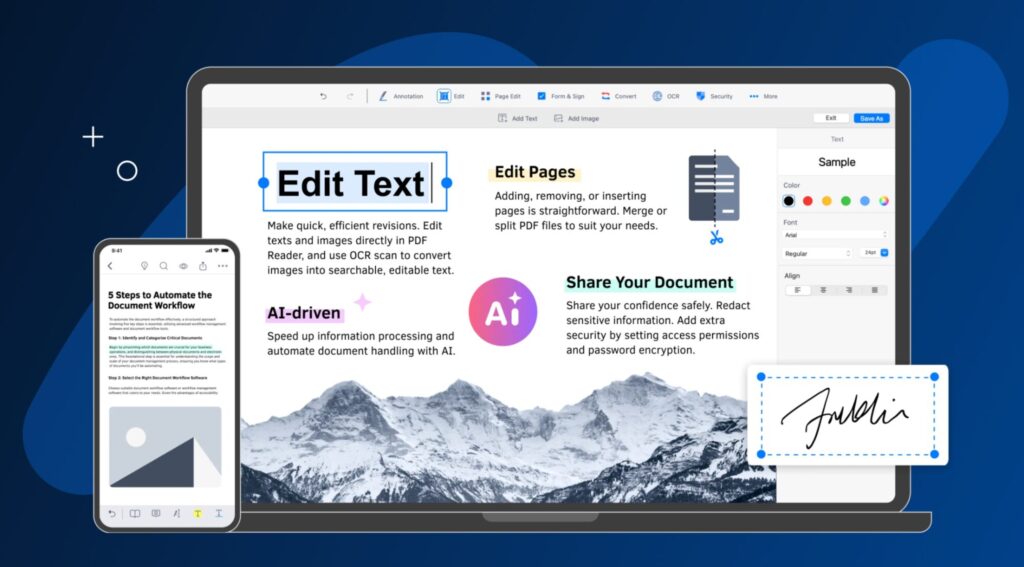
When evaluating alternatives in 2026, the goal isn’t to find the tool with the most features on paper—it’s to choose one that supports your actual workflow with clarity and consistency. A practical PDF tool should offer the essential editing functions you rely on every day, from adjusting text to reorganizing pages, without unnecessary complexity. Reliable OCR has also become a must-have, especially as more documents come from scans, photos, or mixed formats that need to be converted into searchable text. Digital signatures and form tools should feel straightforward and dependable, allowing you to sign, fill, and send documents without friction. Strong security options, including password protection and controlled sharing, remain just as important as usability, ensuring your files stay protected across devices. And for many users tired of recurring fees, one-time or transparent pricing provides long-term stability and ownership without the pressure of monthly renewals.
Key features to prioritize:
Essential editing functions
A good PDF tool should make everyday tasks simple—editing text, rearranging pages, adding annotations, and exporting files. These core actions should feel intuitive and fast, not buried behind complicated menus.
Reliable OCR
With more documents coming from scans or mobile photos, OCR accuracy is crucial. A reliable OCR engine helps convert those files into searchable, editable text without distortions or formatting errors.
Digital signatures and forms
Signing contracts or filling out forms should be quick and stress-free. A strong PDF tool offers smooth digital signing, form creation, and form completion, making administrative tasks faster and more organized.
Strong security options
Document protection matters more than ever. Password settings, restricted permissions, and secure sharing options ensure sensitive information stays private whether you’re working alone or across devices.
One-time or transparent pricing
Instead of recurring subscription charges, many users prefer software they can simply own. Clear, predictable pricing offers long-term value and removes the pressure of remembering renewal dates.
FAQ — Frequently Asked Questions
1. Can I safely cancel my Acrobat subscription?
Yes. Canceling your Acrobat subscription doesn’t affect your existing PDF files or your ability to view them. You simply lose access to Acrobat’s paid features, not your documents themselves. Before canceling, most users export any Acrobat-specific settings they want to keep, but the files remain fully usable.
2. Will my PDFs still work normally after switching tools?
Absolutely. PDFs follow an open standard, so they remain compatible across different readers and editors. As long as you choose a well-maintained PDF tool, you can open, edit, sign, and share your files without encountering format issues.
3. Can alternative PDF apps edit scanned files?
Yes—if the new tool includes OCR (Optical Character Recognition). OCR converts scanned pages or photos into searchable and editable text. Most modern PDF apps offer this feature, though accuracy can vary depending on the engine and the quality of the original scan.
4. Are digital signatures valid without Adobe Acrobat?
Yes. Digital signatures follow universal security standards, not Acrobat-specific technology. As long as the PDF tool supports standard digital signing formats (like PKCS#7), signatures remain legally valid and accepted for contracts, forms, and other official documents.
5. Is a one-time-purchase PDF tool more cost-effective?
For many users, yes—especially if your PDF needs are consistent and not tied to advanced enterprise workflows. A one-time purchase removes ongoing fees and offers predictable long-term value, making it a practical choice for students, freelancers, and small teams.
Reevaluating What Matters in Your PDF Toolkit
By 2026, many users have reached a natural turning point in how they think about software subscriptions. What once felt convenient now feels crowded—multiple recurring payments, rising costs, and tools that deliver far more than what most people actually need. This shift has encouraged individuals and small teams to reevaluate which software is truly essential and which subscriptions no longer justify their monthly price.
As users look for alternatives, the appeal of faster, simpler, and more affordable PDF tools becomes increasingly clear. A good PDF solution doesn’t have to be complicated or expensive to be effective—it just needs to support everyday tasks with speed, clarity, and reliability. For anyone feeling the weight of subscription fatigue, now is a meaningful moment to explore options that offer long-term value without the ongoing cost.
Simplify Your PDF Workflow Today
Experience a lightweight, intuitive editor designed to help you sign, merge, and OCR documents faster than ever—without the unnecessary complexity.


Connect with KDAN
Follow us to receive all latest updates and promotions.