


 KDAN PDF for Windows
 Lifetime License for Windows
 LynxPDF for Enterprise
 ComPDF SDK
 Edit PDF
 Add Image
 Add Hyperlink
 Annotate PDF
 Fill in PDF
 Rotate & Crop
 Rearrange PDF
 Add Pages
 Delete Pages
 Bates Numbering
 Sign PDF
 Password Protect
 Unlock PDF
 Merge PDF
 Split PDF
 Convert PDF
 OCR PDF
 Compress PDF
 Slideshow Mode
Top 10 Must-Have PDF Templates for Small Businesses & Freelancers in 2026
In 2026, freelancers and small businesses rely more than ever on standardized PDF templates to keep their operations organized and efficient. As client expectations rise and project timelines become tighter, having ready-to-use documents—such as invoices, proposals, contracts, and work orders—helps ensure consistency and professionalism across every interaction.
Digital document workflows have also become essential for reducing administrative time. Instead of rebuilding forms from scratch, businesses can streamline processes by using structured templates that are easy to update, reuse, and share. This shift not only supports smoother collaboration, but also helps teams maintain accurate records for accounting, project management, and tax preparation.
Tools like KDAN PDF play a key role in this workflow transformation. With intuitive editing features, flexible organization tools, and cross-device compatibility, KDAN enables users to fill, customize, sign, and manage templates with ease. For freelancers and SMBs aiming to save time and enhance document quality, adopting reliable PDF solutions has become an indispensable part of operating in a digital-first business environment.
What Are Essential PDF Templates for Freelancers & SMBs?
Essential PDF templates are pre-designed documents that help freelancers and small businesses manage everyday operations more efficiently. Instead of building forms from scratch, teams can rely on structured layouts that guide important tasks such as billing, planning, and client communication. This saves time, reduces administrative errors, and ensures a more consistent workflow across projects.
Common uses include:
- Invoices for clear and accurate billing
- Quotes or estimates to outline pricing before work begins
- Contracts and agreements to define responsibilities and protect both parties
- Business proposals to communicate project scope and services
- Internal management forms such as timesheets, budgets, and work orders
These templates create uniformity across business documents, helping freelancers and SMBs maintain a professional appearance with every client interaction. At the same time, they remain flexible—allowing users to adjust branding, content, and formatting to fit their specific needs. This combination of structure and customization makes PDF templates an essential foundation for efficient, organized business management in 2026.
Why Use KDAN PDF With Business Templates?
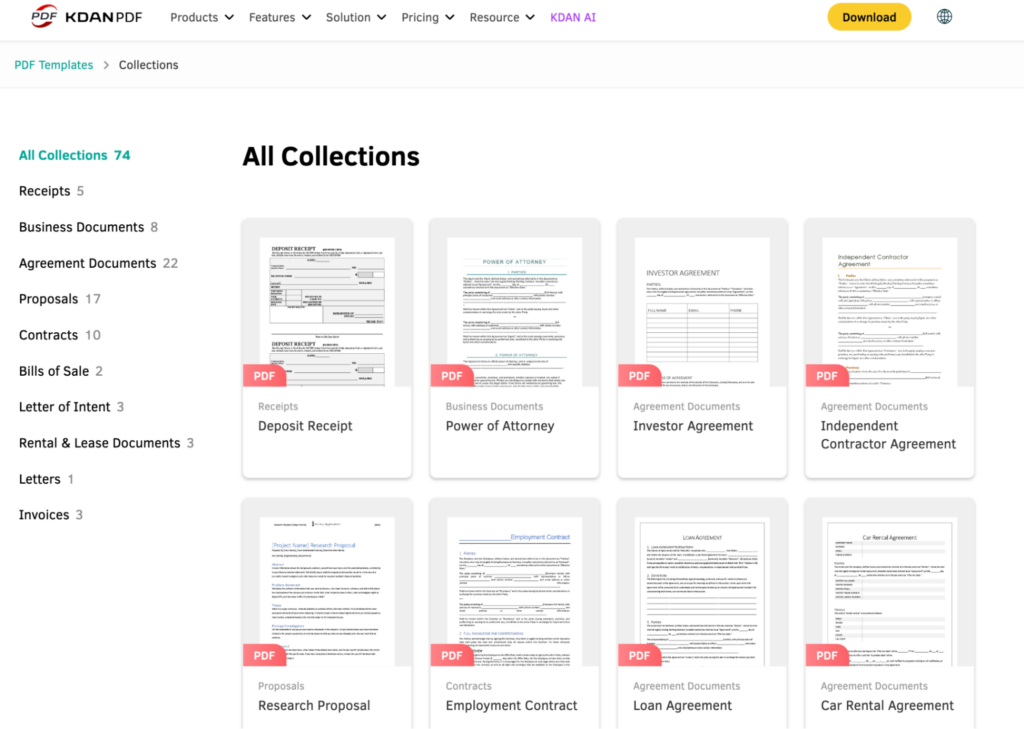
Using KDAN PDF makes it easier for freelancers and small businesses to manage and customize their essential templates. Its intuitive editing tools allow users to quickly fill in fields, adjust text, and personalize layouts without needing advanced design skills. KDAN also offers a collection of free PDF templates on its official website, giving users a convenient starting point for invoices, proposals, contracts, and other business documents. This helps ensure every document looks polished and consistent across all client interactions.
Key advantages include:
- Easy-to-use editing tools for filling in details, adjusting sections, and customizing templates
- Support for digital signatures, annotations, and form fields, making it simple to finalize agreements or review documents
- Ability to organize, merge, and export files, ensuring smoother collaboration with clients or team members
- Cross-device compatibility on both mobile and desktop, allowing users to manage documents from anywhere
With these features, KDAN PDF provides a flexible and reliable workflow that supports both quick edits and more detailed document management, helping businesses stay organized and professional throughout every project.
The 10 Essential Templates Every Freelancer & SMB Should Have
KDAN’s template collection includes a variety of ready-to-use PDF forms that help freelancers and small businesses handle daily administrative tasks more efficiently. These templates cover financial documents, agreements, proposals, and other essential paperwork, making it easier to maintain consistency and professionalism across projects.
Essential templates include:
- Invoice Templates: For clear and accurate billing
- Agreement Forms (e.g., Independent Contractor Agreement, Investor Agreement): For defining responsibilities and outlining legal terms
- Proposal Templates: For communicating project details and presenting service offerings
- Receipt Templates: For documenting completed payments
- Business Forms such as Power of Attorney: For handling formal authorization or operational tasks
- Lease and Rental Agreements: For property or equipment rental situations
- Bill of Sale Templates: For documenting item transfers or purchases
- Letter Templates such as Letters of Agreement or Authorization: For formal communication
- Financial Forms: For budgeting, statements, and recordkeeping
- Miscellaneous Business Templates: For day-to-day operational needs
These templates are designed to be flexible, allowing users to fill in key information while maintaining a clean, professional layout.
For example:
- Proposal Template
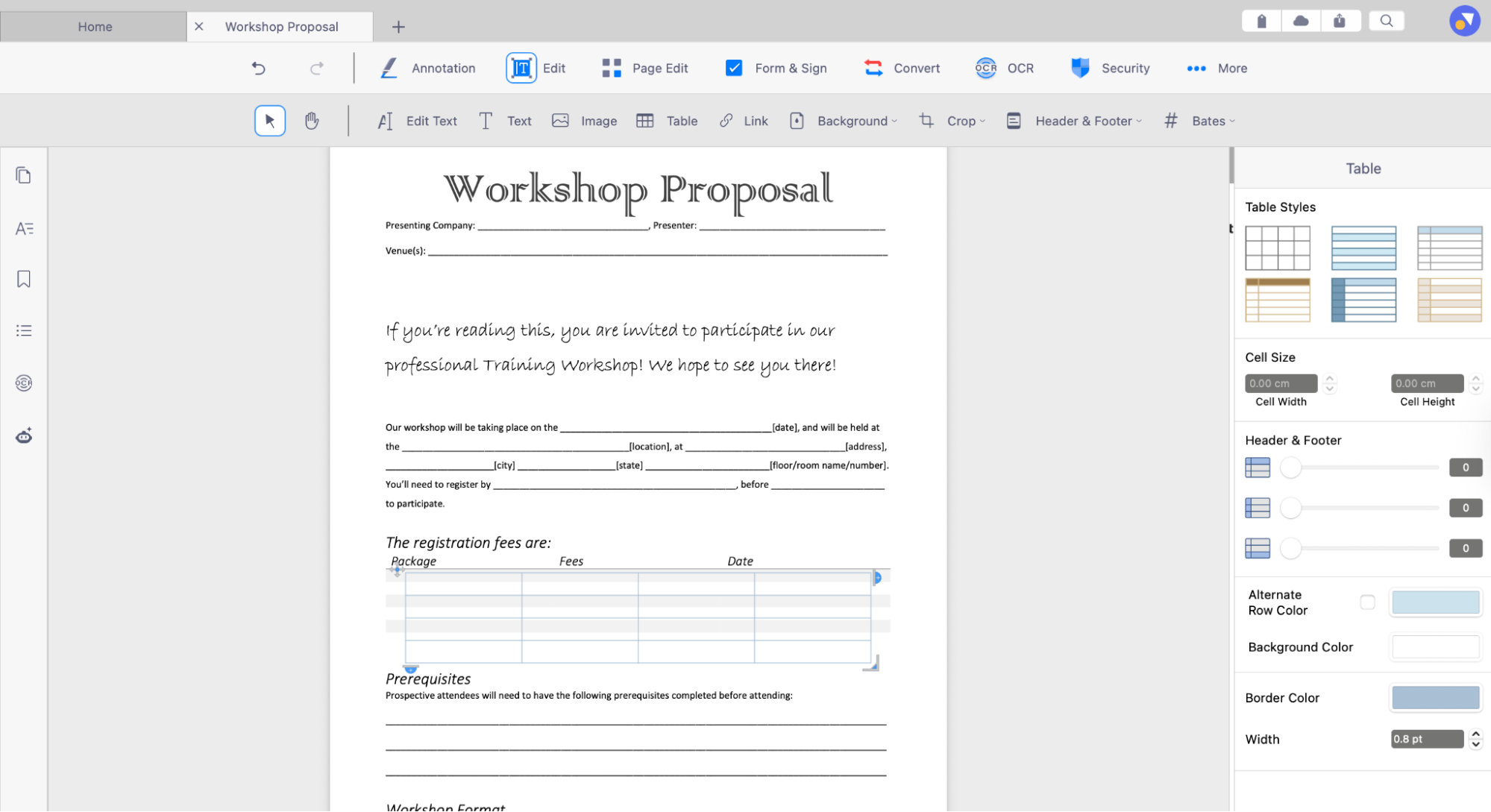
A Proposal Template helps you present your services, timelines, and pricing in a structured way—ideal for pitching new clients. With KDAN’s editing tools, you can easily modify tables, adjust layouts, and update content to match each project’s requirements, making every proposal both clear and customized.
- Independent Contractor Agreement
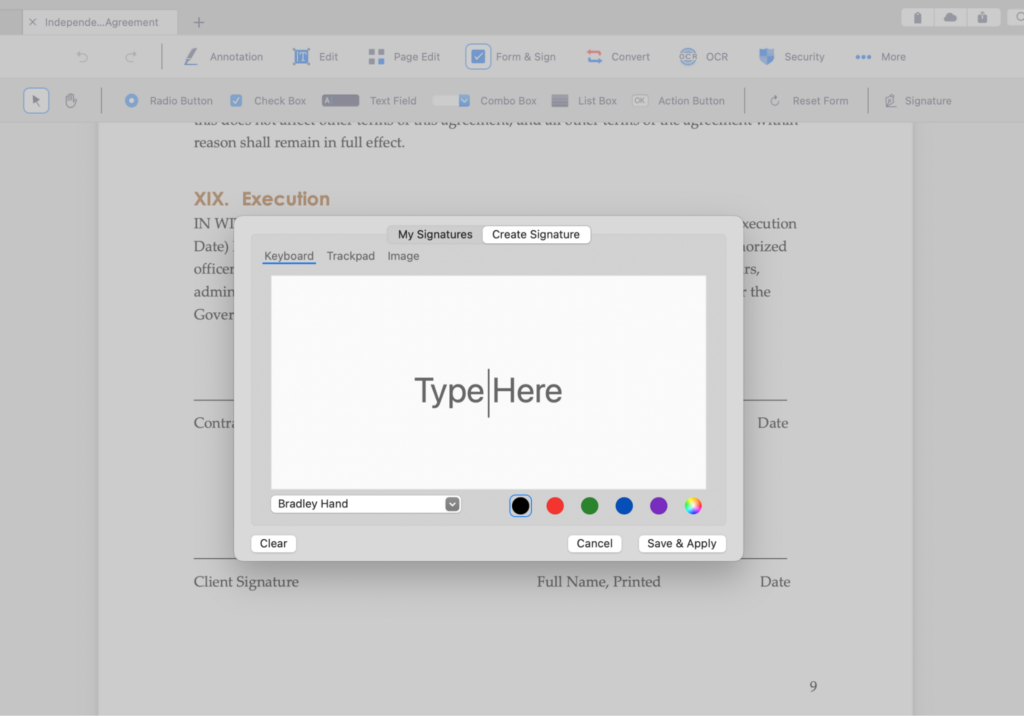
An Independent Contractor Agreement provides a clear framework for project terms, payment schedules, and deliverables, reducing misunderstandings later in the project. With KDAN’s built-in digital signature support, both parties can sign the agreement electronically, finalize approvals faster, and keep a secure, time-stamped record of the contract.
- Receipt Template
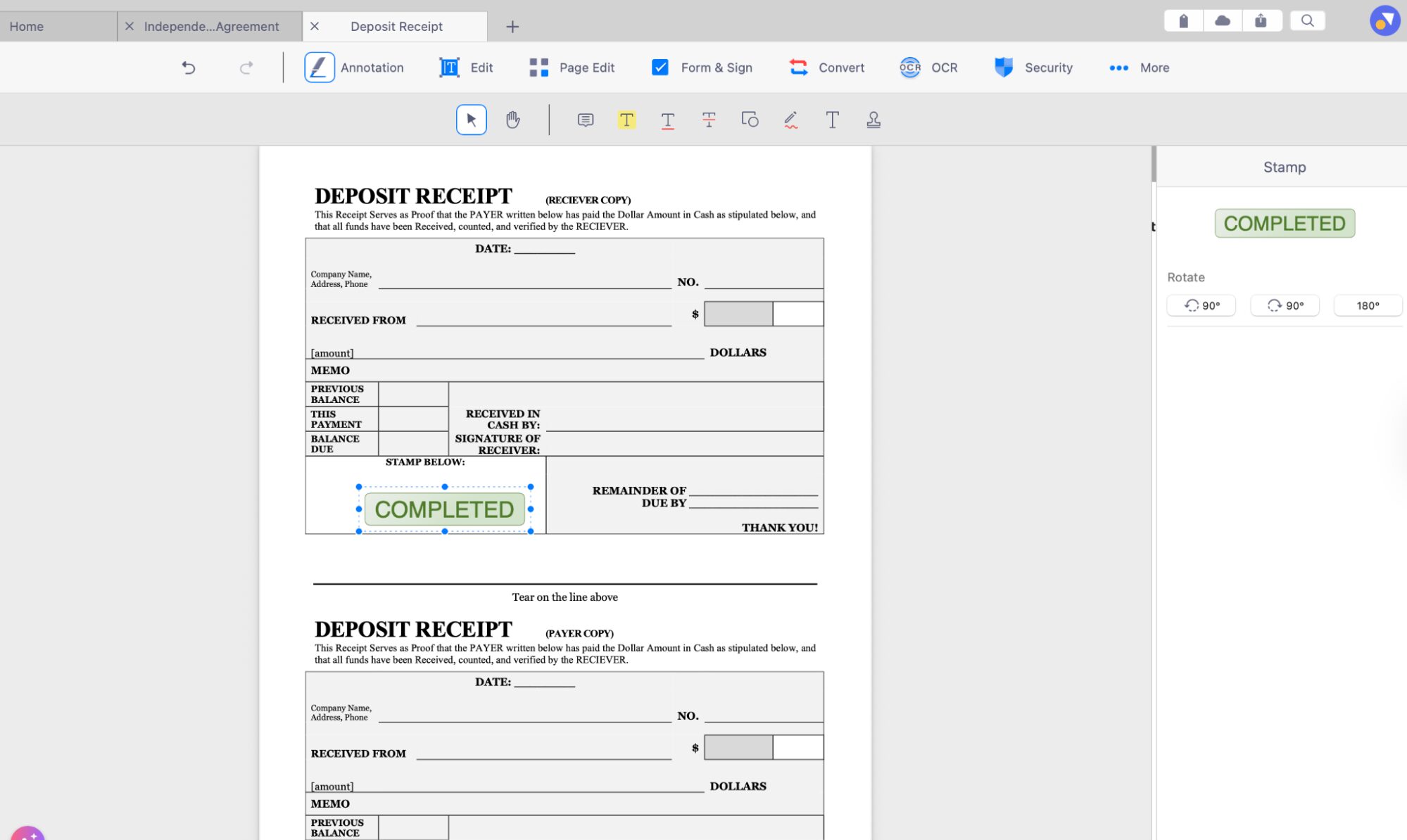
A Receipt Template makes it easy to issue consistent and well-formatted proof of payment after each transaction. With KDAN’s built-in stamp feature, you can quickly apply approval stamps, “Paid” markings, or verification seals—making the review and confirmation process faster and more reliable.
By starting with these standardized templates, freelancers and SMBs can save time, minimize formatting tasks, and create documents that feel polished and trustworthy.
Additional Tips for Managing Business Documents
Managing business documents effectively helps freelancers and small businesses stay organized and maintain a professional workflow. A few simple practices can keep your files accurate, consistent, and easy to retrieve when needed.
Tips to follow:
- Review and customize templates before sending them to clients to ensure all details are accurate and relevant to the project.
- Maintain consistent branding across all PDFs by keeping fonts, colors, and logos uniform.
- Keep a digital archive for accounting and tax season so invoices, receipts, and agreements are always accessible.
- Update older templates periodically to ensure the information, terms, and formatting reflect your current business needs.
These habits help create smoother communication with clients and keep your document workflow clean and reliable throughout the year.
FAQ: Freelancers & SMBs (2026 Edition)
1. Why should freelancers and SMBs use PDF templates instead of creating documents from scratch?
PDF templates provide a ready-made structure that saves time, ensures consistency, and reduces formatting errors. They also help maintain a professional appearance across all client communications.
2. Can I customize these templates to match my brand?
Yes. You can add logos, adjust colors, edit text, and modify tables using tools like KDAN PDF to ensure every document aligns with your brand identity.
3. Are PDF templates secure for sending contracts or financial documents?
PDFs support password protection, restricted editing, and secure digital signatures. Using KDAN PDF’s security features helps protect sensitive information.
4. Do I need special software to fill out or sign these templates?
Most templates require a PDF editor. KDAN PDF allows you to fill in fields, add signatures, insert stamps, and export documents without converting to other formats.
5. How often should I update my business templates?
It’s recommended to review and update templates at least once a year—or whenever your pricing, terms, or branding changes—to ensure accuracy and professionalism.
Conclusion
Using standardized PDF templates is one of the simplest ways for freelancers and small businesses to streamline their daily operations. These ready-made documents help ensure consistency, reduce repetitive work, and support clearer communication with clients.
KDAN PDF further enhances this process by offering intuitive editing tools, digital signatures, stamps, and flexible document management features. With these capabilities, businesses can complete paperwork faster and maintain a higher level of accuracy across all their files.
As workflows continue to shift toward digital-first practices in 2026, adopting these essential templates—along with a reliable PDF editor—can help freelancers and SMBs stay organized, efficient, and fully prepared for every project ahead.
(The featured image is made by Andrew Nee on Unsplash)



Connect with KDAN
Follow us to receive all latest updates and promotions.