


 KDAN PDF for Windows
 Lifetime License for Windows
 LynxPDF for Enterprise
 ComPDF SDK
 Edit PDF
 Add Image
 Add Hyperlink
 Annotate PDF
 Fill in PDF
 Rotate & Crop
 Rearrange PDF
 Add Pages
 Delete Pages
 Bates Numbering
 Sign PDF
 Password Protect
 Unlock PDF
 Merge PDF
 Split PDF
 Convert PDF
 OCR PDF
 Compress PDF
 Slideshow Mode
How to Fill Out a 1040 Form PDF in 2026: The Complete Employee Guide (Windows, Mac & Mobile)
Tax season is here, and for millions of Americans, April means facing the ultimate paperwork boss:the IRS Form 1040.
Unlike a simple onboarding document, your Form 1040 (U.S. Individual Income Tax Return) is the master record of your financial life for the past year. To fill it out correctly, you don’t just need the form itself—you need to gather W-2s from your employer, 1099s from side gigs or investments, and a mountain of digital receipts.
Historically, this meant printing out dozens of pages, covering your dining table in paperwork, doing math with a desk calculator, and hoping you didn’t lose a page before mailing it to your Certified Public Accountant (CPA). Furthermore, if you rely on a Windows PC at work but a Mac at home, finding a single, cohesive PDF software to manage everything across all your devices can often be a frustrating challenge.
It’s time for a major upgrade.
In this comprehensive guide, we will walk you through how to fill out a 1040 Form PDF using KDAN PDF. We’ll show you how to merge your scattered tax documents into one neat packet, use AI to decode complex tax jargon, apply a crisp and professional electronic signature, and—most importantly—lock down your sensitive financial data with enterprise-grade password protection.
► Download the official 1040 PDF from the IRS website
Tax Basics: Understanding Your 1040 Form
Before we start filling in the boxes, let’s make sure you have everything you need.
► Download the official 1040 PDF from the IRS website
What is the IRS Form 1040?
The IRS Form 1040 (U.S. Individual Income Tax Return) is the official document that U.S. taxpayers use to file their annual income tax return. This master form calculates your total taxable income and determines whether you owe the government money or if you are eligible for a tax refund.
What Documents Do You Need Before Starting?
You cannot fill out a 1040 from memory. Before you begin, ► Download the official 2026 Form 1040 PDF from the IRS website, and gather the following digital files:
- Personal Identification: Social Security Numbers (SSN) or Taxpayer Identification Numbers for you, your spouse, and any dependents.
- Income Statements (W-2 Forms): Issued by your employer(s) detailing your annual wages and the taxes already withheld.
- Miscellaneous Income (1099 Forms): Such as 1099-NEC (freelance or side-gig income), 1099-INT (bank interest), or 1099-DIV (investment dividends).
- Deduction Records: Digital receipts for medical expenses, educational costs, or charitable donations if you plan to itemize.
The Problem: These files are usually scattered across your downloads folder, email inbox, and desktop. Trying to manage ten different PDFs while filling out your return is a recipe for errors. Let’s fix that first.
Step-by-Step — How to Fill Out the 1040 Form PDF Using KDAN PDF
IRS forms are notorious for tiny boxes and complex instructions. Using a premium, cross-platform PDF editor makes this process incredibly smooth.
Prerequisite: Download KDAN PDF (Free trial available for Windows,Mac,iOS, and Android).
Step 1: Organize Your Tax Packet (Merge PDF)
Instead of sending your CPA five different emails with ten loose attachments, create one master tax file. This ensures nothing gets lost in the shuffle.
- The KDAN PDF Solution: Open KDAN PDF and go to the Secure & Compose menu. Select the Merge PDF tool.
- Action: Select your blank 1040 PDF (Note: in the 2026 tax season, you are filing the 2025 form) , your W-2s, and your 1099s. Combine them all into a single file named “2026_Tax_Return_[YourName].pdf”. Now, you have a beautiful, organized workbook to start your filing.
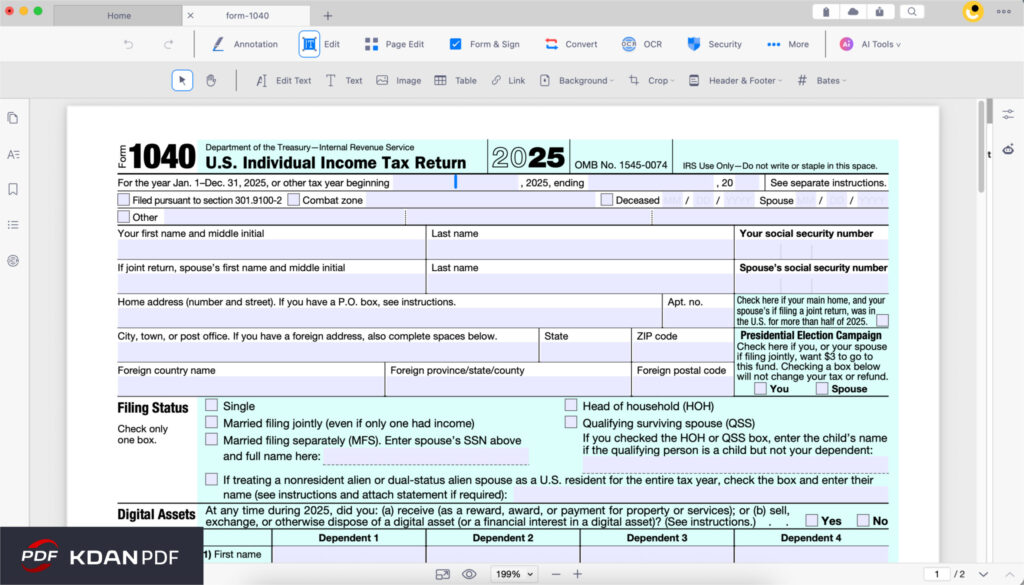
Step 2: Enter Personal Information (Fill in PDF)
The top half of the 1040 is all about who you are.
- The KDAN PDF Solution: Navigate to the Edit menu and click Fill in PDF. KDAN PDF will automatically detect the interactive form fields provided by the IRS.
- Action: Type in your Name, Address, and SSN. Select your Filing Status (e.g., Single, Married Filing Jointly). The text will auto-size to fit perfectly inside the IRS boxes, keeping the document looking incredibly neat.
Step 3: Decoding Income & Deductions (AI Assistance)
As you move down to the “Income” and “Standard Deduction” sections, IRS terminology can feel like reading a foreign language. What exactly counts as a qualified dividend? What is the specific standard deduction amount for 2026?
- The KDAN PDF Solution: Don’t waste time toggling between your PDF and a browser search. Use the KDAN AI Chatbot directly inside your PDF reader to get instant clarity.
- The Action: Simply highlight a confusing instruction on the form or type your question:
“What is the standard deduction for a Head of Household in 2026?” The AI will instantly summarize the rule in plain English, allowing you to fill in the correct box with total confidence.
Step 4: Do the Math and Double-Check (Annotate PDF)
- Lines 1 through 15 require you to add and subtract various incomes and deductions. Making a math error here is the most common reason for IRS delays.
- The KDAN PDF Solution: Use the Annotate PDF tools (found under the Edit menu).
- Action: Use the text box or highlighter tools to jot down your math in the blank margins of the PDF.
- For example :
💡 Tip: The “Digital Scratchpad” Method Don’t guess your totals. Use the Text Box tool to write your math directly in the PDF margins like this: - W-2 Income: $50,000
- 1099 Income: $5,000
- Margin Note: “Total $55,000 — checked on March 15”
Once you’re sure of the math, type the final $55,000 into the official Line 1z box. This “digital paper trail” helps you (and your accountant) double-check your work easily before submission.
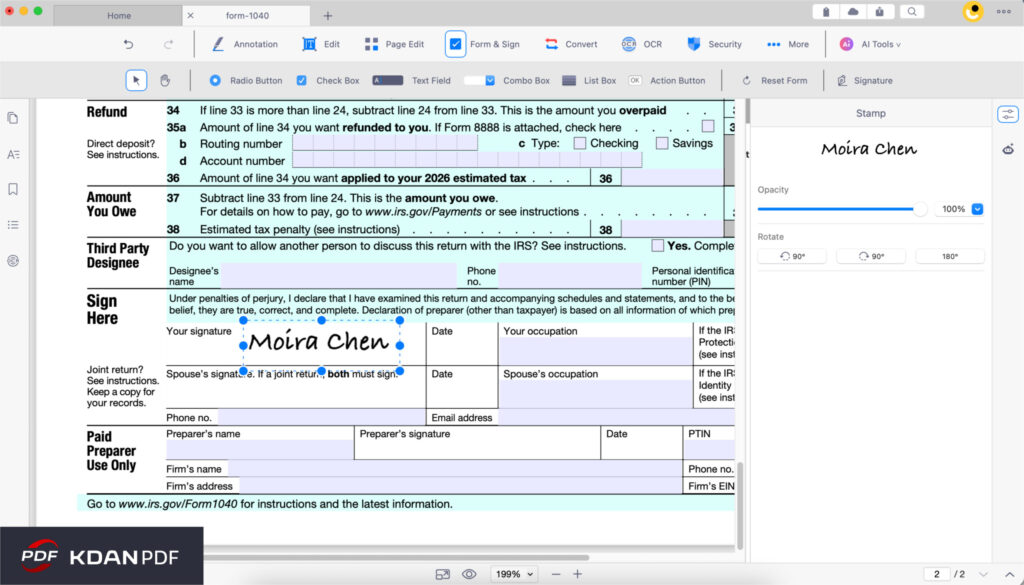
Step 5: Sign Professionally (Sign PDF)
Your 1040 is not valid until it is signed. In the past, this meant printing the final page, signing it with a pen, scanning it back into the computer, and dealing with a crooked, low-quality image.
- The KDAN PDF Solution: Emphasize a paperless, highly professional workflow using the Sign PDF tool (under Secure & Compose).
- Action:
- Click Sign PDF and choose to create a new signature.
- You can draw your signature smoothly using your trackpad/mouse, or import a clean image of your hand-drawn signature.
- Drag and drop the signature onto the “Sign Here” line on page 2 of the 1040.
- Why this matters: A crisp, properly aligned electronic signature gives your tax documents a highly professional appearance. It shows your CPA or tax preparer that you are organized. When sending your tax packet to your accountant for e-filing, a digital signature offers the ultimate convenience of never needing to touch a printer.
Advanced Tips and Ultimate Security
Because the 1040 form contains your entire financial blueprint, standard editing isn’t enough. You need tools to protect and manage this heavy data.
Security First: Protecting Your SSN (Password Protect)
Your completed 1040 packet now contains your Social Security Number, your exact income, your home address, and possibly your bank routing numbers (for your refund). Do not email this as a regular attachment.
- The KDAN PDF Solution: Before you send this to your CPA or save it to your cloud drive, go to the Secure & Compose menu and select Password Protect.
- Action: Apply a strong, enterprise-grade password to the file. When you email the PDF to your accountant, send the password to them separately via a secure text message or phone call. If your email is ever compromised, your financial identity remains locked and safe.
Manage Large and Cluttered Files (Compress & Split)
Tax returns can get unwieldy.
- File Too Large? If you merged high-resolution scans of your receipts and W-2s, your PDF might exceed your email provider’s 25MB attachment limit. Simply go to Convert & Other and select Compress PDF to shrink the file size while maintaining readability.
- Too Many Blank Pages? The official IRS download often includes dozens of pages of instruction manuals. Your accountant only wants the actual 1040 form. Use Delete Pages or Split PDF (under the Organize menu) to strip out the instruction pages, leaving only the clean, filled-out return.
Why KDAN PDF Beats Mac-Only Alternatives
If you are looking for a PDF editor to handle your taxes, you might come across tools like PDF Expert. While it is a functional app, it suffers from a massive drawback for the modern worker: It is strictly limited to Apple devices.
If you are a freelancer who uses a Mac desktop at home, but a Windows laptop for your 9-to-5 job, or if you want to review your tax return on your Android tablet while commuting, a Mac-only tool leaves you stranded.
KDAN PDF is built for cross-platform freedom.
| Feature / Capability | PDF Expert | KDAN PDF |
| Supported Platforms | Mac & iOS Only | Windows, Mac, iOS, Android |
| Tax Document Organization | Merge/Split | Merge, Split, Delete Pages, Compress |
| Pricing Model | Subscription | Subscription OR |
| Built-in Assistance | Limited | Integrated AI Chatbot for terminology |
The “Permanent License” Advantage:
Tax software and document editors shouldn’t be a lifelong financial drain. For professionals who want to control their expenses, KDAN PDF offers a Permanent License option. You pay once, own the software, and can use it every tax season without worrying about recurring monthly fees.
FAQ — Common 1040 Questions
Q: Can I fill out and sign my 1040 on my Android phone or iPhone?
A: Yes! With KDAN PDF’s highly-rated mobile apps, you can access your merged tax packet via KDAN Cloud, fill in the text boxes, and draw your professional signature directly on your touchscreen.
Q: My employer sent my W-2 as a static image, not a PDF. What do I do?
A: KDAN PDF includes an OCR PDF (Optical Character Recognition) feature under the Convert & Other menu. This tool can scan the image and convert it into a searchable PDF, making it much easier to copy and paste your employer’s EIN or your wage numbers directly into your 1040.
Q: Is it better to type my name or draw my signature on the 1040?
A: While typing a cursive font is possible, drawing your signature (or uploading an image of your actual signature) provides a much more professional and authentic appearance. It mimics a traditional wet-ink signature perfectly, offering both convenience and a polished look for your final submission.
Conclusion: File Your Taxes with Confidence
Preparing your taxes will probably never be your favorite weekend activity, but organizing the paperwork doesn’t have to be a nightmare of printed pages and missing receipts.
By using KDAN PDF, you transform a chaotic process into a streamlined, digital workflow. You can easily merge your W-2s, use AI to demystify IRS instructions, apply a convenient and professional signature, and lock down your SSN with robust password protection.
Whether you are using a Windows PC at the office or a Mac at home, you have all the tools you need to conquer your 1040.
Secure Your Sensitive Financial Data for 2026.
Protect your SSN and financial records with enterprise-grade password encryption. Fill out W-9 forms and apply legally valid digital signatures with KDAN PDF for a safer, paperless filing experience.



Connect with KDAN
Follow us to receive all latest updates and promotions.