


 KDAN PDF for Windows
 Lifetime License for Windows
 LynxPDF for Enterprise
 ComPDF SDK
 Edit PDF
 Add Image
 Add Hyperlink
 Annotate PDF
 Fill in PDF
 Rotate & Crop
 Rearrange PDF
 Add Pages
 Delete Pages
 Bates Numbering
 Sign PDF
 Password Protect
 Unlock PDF
 Merge PDF
 Split PDF
 Convert PDF
 OCR PDF
 Compress PDF
 Slideshow Mode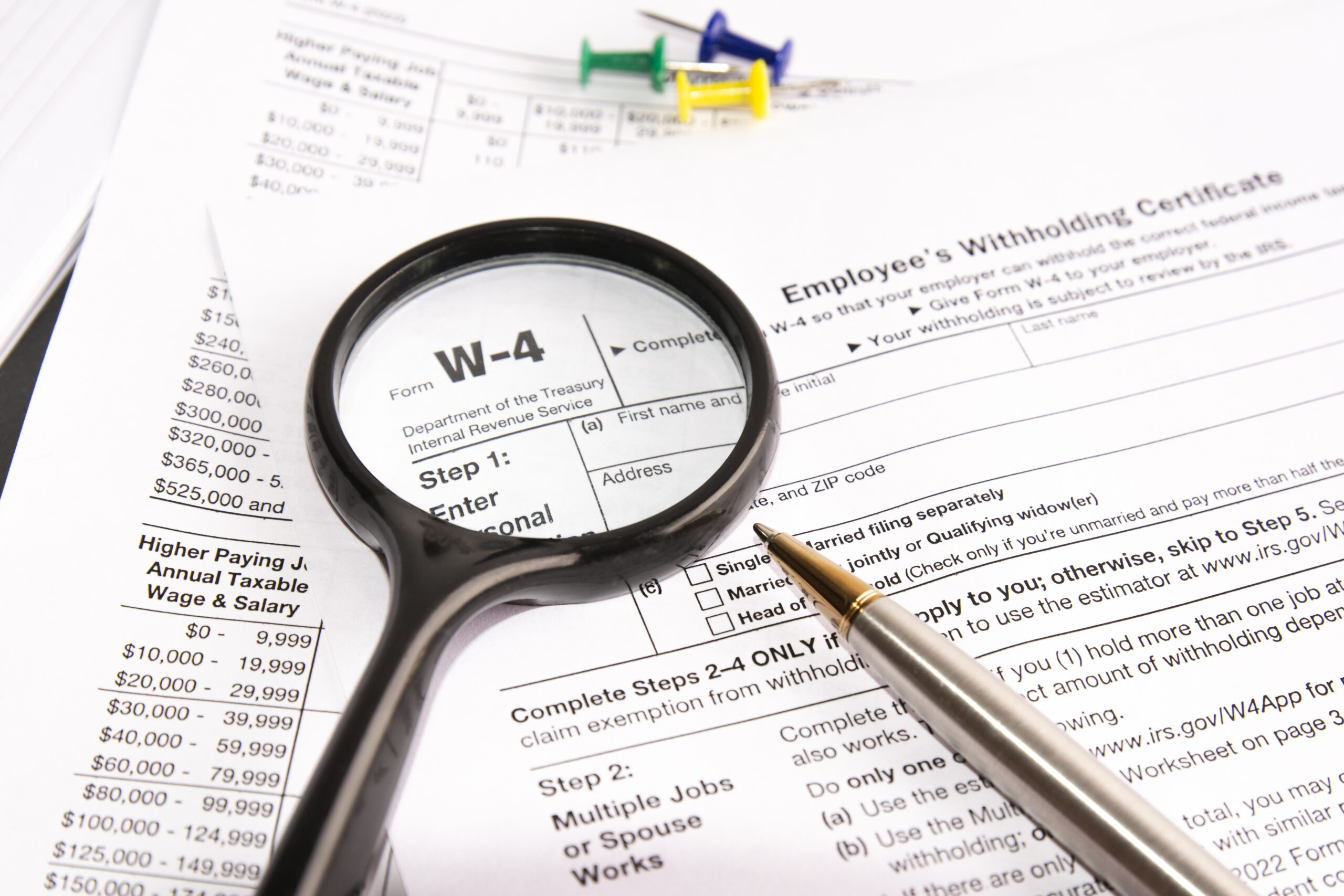
How to Fill Out a W-4 Form PDF in 2026: The Complete Guide (Windows, Mac & Mobile)
Starting a new job is exciting. Filling out the paperwork? Not so much.
Among the stack of onboarding documents, the IRS Form W-4 (Employee’s Withholding Certificate) is the most critical. It determines how much federal income tax is withheld from your paycheck. Fill it out correctly, and you’ll break even at tax time. Fill it out wrong, and you could owe the IRS a massive bill next April—or give them an interest-free loan all year.
While Mac users might turn to tools like PDF Expert, what if your company issues you a Windows laptop? Or what if you need to make a quick update on your Android phone?
You need a tool that works everywhere.
In this guide, we’ll show youhow to fill out a W-4 form PDF correctly using KDAN PDF. We’ll cover how to handle the tricky “Multiple Jobs” section using AI, how to apply a professional electronic signature, and how to do it all on any device (Mac, Windows,iOS, or Android).
► Download the official W-4 PDF from the IRS website
What is the IRS Form W-4 and Why is it Critical?
The W-4 Form tells your employer how much federal tax to withhold from each paycheck.
- If you withhold too little: You will owe taxes when you file your return and might pay a penalty.
- If you withhold too much: Your monthly paycheck will be smaller than it needs to be (and you’ll get a refund later).
W-4 vs. W-9: What’s the difference?
- Form W-4: For Employees (You get a regular paycheck and a W-2 at year-end).
- Form W-9: For Freelancers/Contractors (You handle your own taxes).
When Should You Update Your W-4?
You aren’t just required to fill this out when you get hired. You should submit a new W-4 PDF to your HR department whenever your life situation changes:
- Marriage or Divorce: Your tax bracket changes significantly.
- New Child: You get a $2,000 tax credit per child under 17.
- Side Hustle: If you start driving for Uber or freelancing, you may need to withhold extra from your main job to cover those taxes.
- Buying a House: Mortgage interest deductions might mean you can withhold less tax.
Step-by-Step: How to Fill Out W-4 Form PDF Using KDAN PDF
IRS forms are notorious for tiny fonts and confusing instructions. Here is how to navigate the 2026 W-4 using KDAN PDF.
Prerequisite:
- Download the official W-4 PDF from the IRS website.
- Download KDAN PDF (Free trial available for Mac, Windows, iOS, and Android).
Step 1: Personal Information
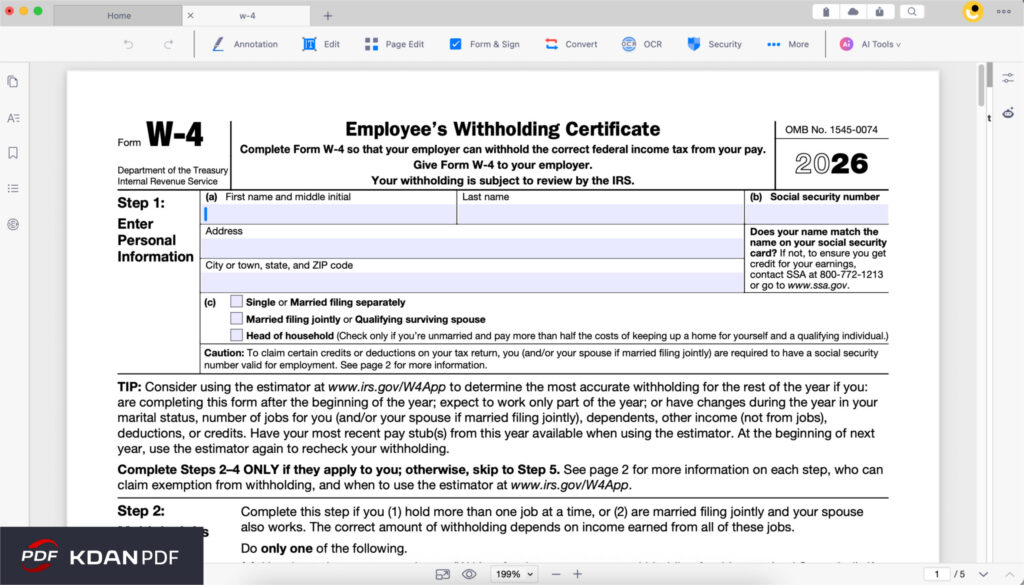
Open the PDF in KDAN PDF. KDAN PDF’s “Form Filling” feature (found under the Edit menu) automatically highlights interactive fields.
- Action: Type your Name, Address, and SSN.
- Filing Status: Check Single, Married Filing Jointly, or Head of Household.
- Confused? Use KDAN AI Chatbot. Ask: “What qualifies as Head of Household?” to get a simple definition instantly.
Step 2: Multiple Jobs or Spouse Works
This is where most people get stuck. If you have more than one job, or if you are married and your spouse also works, you must complete this step to avoid underpaying taxes.
You have three options (a, b, or c).
- Option (c) is the easiest: Check the box if there are only two jobs total with similar pay.
- Option (b) requires using the “Multiple Jobs Worksheet” on page 3.
KDAN Tip: Don’t toggle back and forth between pages. Open the worksheet in a split-view or use KDAN PDF’s Annotate PDF tools to do the math in the margins before filling in the final number.
Step 3: Claiming Dependents
This section lowers your withholding, putting more money in your paycheck now.
- Multiply the number of children under 17 by $2,000.
- Multiply other dependents by $500.
- Action: Enter the total in Line 3.
Step 4: Other Adjustments (Optional)
- 4(a) Other Income: Interest, dividends, or retirement income.
- 4(b) Deductions: If you itemize deductions (like mortgage interest) instead of taking the standard deduction.
- 4(c) Extra Withholding: If you want to force your employer to withhold extra money (e.g., $50 per check) to ensure a refund, put it here.
Step 5: Signing Professionally
You need to sign the form to make it valid.
- The Problem: Printing, signing with a pen, and scanning is slow and results in low-quality documents.
- The KDAN PDF Solution: Use the “Sign PDF” tool (under Secure & Compose).
How to do it:
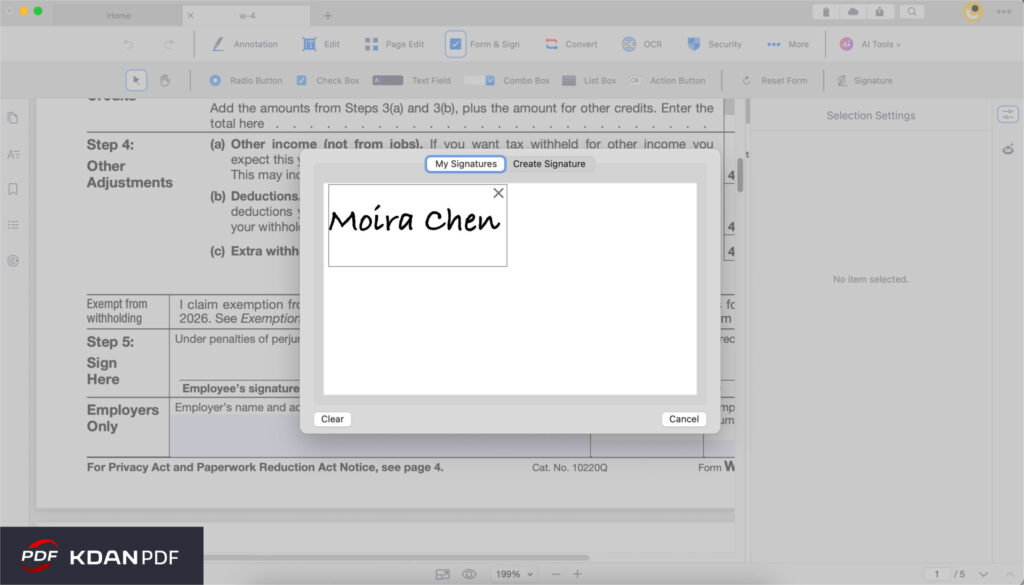
- Select “Sign PDF” from the menu.
- Choose “Create Signature.”
- You can draw with your finger/mouse (Trackpad) or upload an image of your signature.
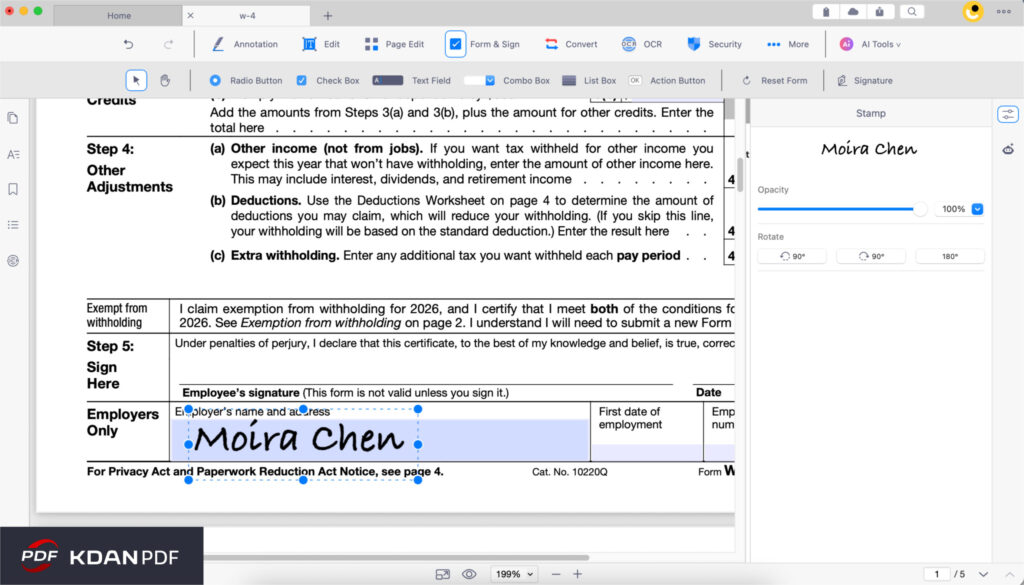
- Place the signature on the line. This creates a crisp, professional look that HR managers appreciate and is much faster than printing.
Bonus Step: Finalize and Organize Your Packet
This is where KDAN PDF shines as a complete document manager. A standard W-4 PDF file has 4 pages, but your employer only needs Page 1. Sending the extra instruction pages looks cluttered.
1. Clean Up the File (Delete Pages):
- Go to the “Organize” menu.
- Select “Delete Pages” (or “Split PDF”) to remove pages 2-4.
- Now you have a clean, single-page W-4 to submit.
2. Combine with Other Onboarding Docs (Merge PDF):
- Starting a new job often means submitting a state tax form and a direct deposit form too.
- Don’t send 3 separate emails. Use the “Merge PDF” feature to combine them all into one organized file named “Onboarding_Packet_[YourName].pdf”.
3. Reduce File Size (Compress PDF):
- If your file is too large to email, use the “Compress PDF” tool (under Convert & Other) to shrink the file size without losing quality.
Solving the “Step 2” Puzzle: AI Assistance
The “Multiple Jobs Worksheet” on page 3 of the W-4 involves a lookup table that many find confusing.
If you are unsure how to interpret the table, ask KDAN AI.
- Prompt: “Explain how to use the Multiple Jobs Worksheet on page 3 of Form W-4.”
- Result: The AI will break down the logic, explaining that you need to find the intersection of your wage and your spouse’s wage to find the correct withholding amount.
This built-in assistance saves you from Googling tax terms in a separate tab.
Security First: Protecting Your SSN
Your W-4 contains your Social Security Number (SSN) and home address. You should strictly control who sees this file.
Password Protection (Essential):
Never email a W-4 as an open attachment. If your email is hacked, your identity is at risk.
- In KDAN PDF, select “Password Protect” (under the Secure & Compose menu).
- Set a strong password.
- Email the PDF to your HR department, but send the password via a separate channel (like Slack or SMS).
- This ensures that even if the file is intercepted, no one can open it without the key.
Why KDAN PDF is the Best Tool (vs. PDF Expert)
You might have heard of PDF Expert as a popular tool for Mac users. While it is a good app, it has a major limitation: It only works on Apple devices.
In the modern workplace, you might use a Windows PC at the office, an iPad for travel, and an Android phone for quick checks. KDAN PDF is designed for this cross-platform reality.
| Feature | PDF Expert | KDAN PDF |
| Supported Platforms | Mac & iOS Only | Windows, Mac, iOS, Android |
| Document Organization | Merge/Split | Merge, Split, Delete Pages, Compress |
| Pricing | Subscription | Subscription OR Permanent License |
| Cross-Device Sync | Apple Ecosystem only | Any Device (via KDAN Cloud) |
The Verdict: If you are a Windows user, or if you use both Windows and Mac, KDAN PDF is the clear winner for filling out tax forms.
►Permanent License
FAQ: Frequently Asked Questions
A: Yes! Unlike some competitors that are iOS-only, KDAN PDF has a fully functional Android app. You can download the W-4, fill fields, and sign it directly on your Android device.
A: While some employers might accept it, it is best practice to use a “wet-ink style” electronic signature. It looks more professional and removes any ambiguity about your intent to sign. KDAN PDF makes it easy to draw or upload your actual signature.
A: You need to use the worksheet on page 3 of the W-4 PDF. You can use KDAN PDF’s “Annotate PDF” tools to write down your calculations directly on the PDF worksheet so you have a record of how you arrived at the number.
Conclusion
Filling out a W-4 doesn’t have to be a struggle with printer ink and scanners. With KDAN PDF, you can handle the calculations, fill in the data, and apply a professional signature in minutes—whether you are on your office PC or your personal phone.
Secure Your Sensitive Financial Data for 2026.
Protect your SSN and financial records with enterprise-grade password encryption. Fill out W-9 forms and apply legally valid digital signatures with KDAN PDF for a safer, paperless filing experience.



Connect with KDAN
Follow us to receive all latest updates and promotions.