


 KDAN PDF for Windows
 Lifetime License for Windows
 LynxPDF for Enterprise
 ComPDF SDK
 Edit PDF
 Add Image
 Add Hyperlink
 Annotate PDF
 Fill in PDF
 Rotate & Crop
 Rearrange PDF
 Add Pages
 Delete Pages
 Bates Numbering
 Sign PDF
 Password Protect
 Unlock PDF
 Merge PDF
 Split PDF
 Convert PDF
 OCR PDF
 Compress PDF
 Slideshow Mode
What Is MCP? Why AI Can Suddenly Help You Work with Documents
AI Is Brilliant — So Why Couldn’t It Help You Save or Edit a PDF?
You’ve probably run into this before: you ask ChatGPT or Claude, “Delete page 3 from this PDF for me.” And you get a very helpful response — “You can use Adobe Acrobat. Here’s how: Step 1, open the file…”
Wait. You didn’t want instructions. You wanted it to do it.
That gap isn’t a sign that AI isn’t smart enough. It’s that AI had no way to actually operate the tools on your computer. It understood what needed to be done — it just couldn’t reach through the screen and click those buttons for you.
Until MCP came along, this was a fundamental limitation of every AI assistant.
Think of It This Way: AI Is Your Expert Consultant. MCP Is Their Access Badge.
Picture this: your company brings in an incredibly capable consultant. They know everything — law, finance, document management, process design. But they don’t have an access badge. They can’t get into the office, can’t log into your systems, can’t touch a single file on your desk. All they can do is sit in a conference room, listen to you describe the problem, and say, “Here’s what you should do.” Helpful, sure. But limited.
MCP — Model Context Protocol — is the access badge.
With MCP, an AI assistant can connect to external tools and systems with your permission and actually execute tasks. Not just tell you what to do. Actually do it. MCP is an open technical protocol developed by Anthropic (the company behind Claude). It creates a standardized communication layer between AI assistants and external tools. Developers can package their tools as “MCP servers,” and AI models can call them directly.
How Is MCP Different from an API?
When people first hear about MCP, a common reaction is: “Isn’t that just an API?” Not quite — though they’re related.
Here’s the short introduction: An API is a communication bridge between two systems. It defines how data gets transferred, but it doesn’t tell the AI anything about what to do with that data. Traditional AI + API integrations usually require a developer to write code, define parameters, and handle errors before the AI can call any given function.
MCP takes things a step further. It’s a protocol designed specifically for AI — one that lets the model autonomously understand what a tool does, decide when to use it, and figure out how to combine multiple tools to complete a task. No developer required every time a new use case comes up. The AI can figure out which “badge” opens which door.
| API | MCP | |
| Designed for | System-to-system | AI-to-tool |
| Integration | Custom dev work required | Standardized protocol, AI calls directly |
| AI understands tool capabilities | ❌ Must be manually defined | ✅ AI infers tool purpose automatically |
| Multi-tool coordination | Complex, requires extra dev | ✅ AI decides how to combine tools |
| Barrier to use | High (coding required) | Low (configure once, then just chat) |
A Real Example: Processing a Quote Sheet with KDAN PDF MCP
Let’s walk through a scenario you probably recognize.
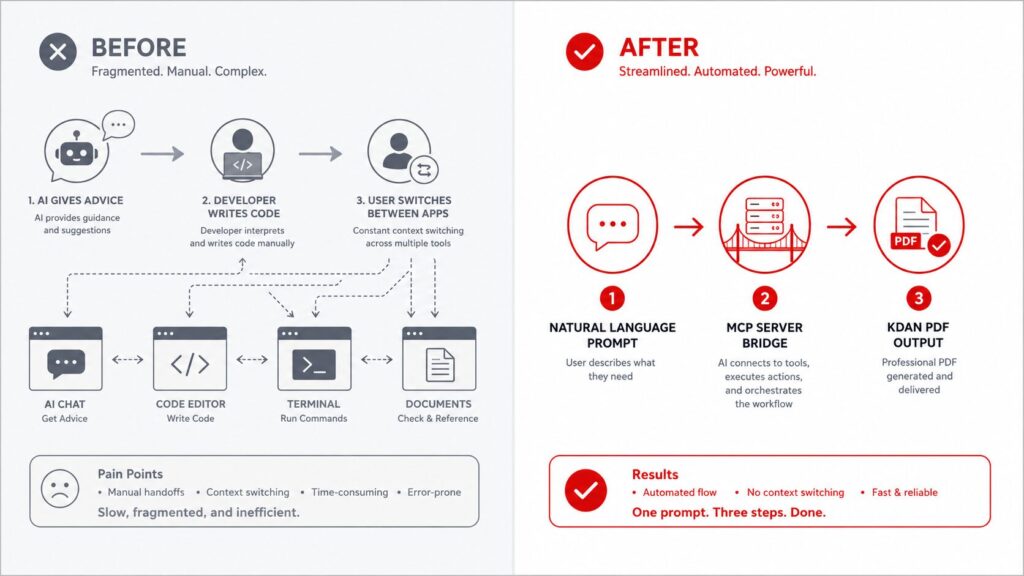
A sales rep needs to send a quote PDF to a vendor — but page 3 contains an internal cost breakdown that shouldn’t go out. The old way: open a PDF editor to remove the page, open a compression tool to reduce the file size, then open email to send it. That’s at least four tools and seven steps.
With KDAN PDF MCP, it looks like this:
① Enable KDAN PDF MCP in Claude (one-time setup, less than 2 minutes)
② Upload the PDF and type your instruction:
“Please remove page 3 of this quote PDF — that’s the internal cost page — then compress it to a size that works for email, keeping the text sharp.”
③ Claude executes through KDAN PDF MCP:
- Locates and deletes page 3
- Compresses the file while preserving text quality
- Outputs the processed PDF
④ Download it and send however you normally would
No switching between windows. No re-uploading files. No learning a new interface. You speak in plain language; the AI handles the tool work.
That’s what MCP actually changes — not that AI got smarter, but that AI finally has hands.
MCP Marks a New Direction in How AI Evolves
Over the past few years, AI progress has mostly been about getting smarter — better comprehension, more accurate answers, more natural conversation.
MCP represents a different kind of progress: the ability to act.
When AI can do more than tell you “here’s what you should do” — when it can actually do it for you — document workflows start to look fundamentally different. Not because of some magic leap in technology, but because AI finally has its access badge.
If you want to see what that means in practice:
- How many windows do you open to send a single quote PDF? — The fragmentation problem in document workflows, and how to fix it
- KDAN PDF MCP — Full Feature Overview: Delete pages, compress, encrypt, all in one place — supported operations and use cases
- KDAN PDF MCP Is Coming: Breaking the limits of how you work with documents — product overview and early access
FAQ
A: MCP (Model Context Protocol) is an open protocol developed by Anthropic that lets AI assistants connect to external tools and directly execute tasks — rather than just telling you how to do them yourself. It’s the technology that takes AI from “knows what to say” to “can actually do it.”
A: An API is a general-purpose communication bridge between systems — it needs a developer to set up every integration and define each operation. MCP is a protocol built specifically for AI, allowing the model to independently understand what tools do, decide when to invoke them, and combine multiple tools to complete a task — without requiring a developer to rebuild the integration each time. In short: APIs let systems talk. MCP lets AI act.
A: Yes. Claude supports MCP connectors. Once you enable a compatible MCP server in the Claude interface, you can interact with connected tools directly through conversation. KDAN PDF MCP is available as a connector in Claude — enable it once, and you can process PDFs right inside your Claude chat.
A: The market for PDF MCP servers is still in its early stages. KDAN PDF MCP is one of the more fully featured options currently available, supporting page deletion, compression, encryption, sensitive content redaction, and document comparison. It can be enabled directly from the Claude interface.
A: The lowest-friction starting point is high-repetition document tasks — the kind of PDFs you regularly need to organize, compress, encrypt, or send out. These tasks have clear rules and fixed operations, which makes them ideal for MCP-based automation. With KDAN PDF MCP, what previously took four separate tools can be completed in a single Claude conversation — no IT support needed, no extra software licenses to purchase.
A: MCP is designed around explicit authorization and user control. The AI only performs operations when you specifically instruct it to — it won’t access or modify files without your input. With KDAN PDF MCP, every action is triggered by the user. The processed file is downloaded by you. Your original document is never altered or shared without your authorization.
Try KDAN PDF MCP
KDAN PDF MCP is now open available on GitHub. Once set up, you can process PDF documents directly inside Claude’s chat interface.
BACK TO SCHOOL 2026
AI helps you think.
KDAN PDF helps you finish.
Highlight, annotate, merge, convert, submit
40% off
Windows / Mac / iOS / Android


Connect with KDAN
Follow us to receive all latest updates and promotions.