


 KDAN PDF for Windows
 Lifetime License for Windows
 LynxPDF for Enterprise
 ComPDF SDK
 Edit PDF
 Add Image
 Add Hyperlink
 Annotate PDF
 Fill in PDF
 Rotate & Crop
 Rearrange PDF
 Add Pages
 Delete Pages
 Bates Numbering
 Sign PDF
 Password Protect
 Unlock PDF
 Merge PDF
 Split PDF
 Convert PDF
 OCR PDF
 Compress PDF
 Slideshow Mode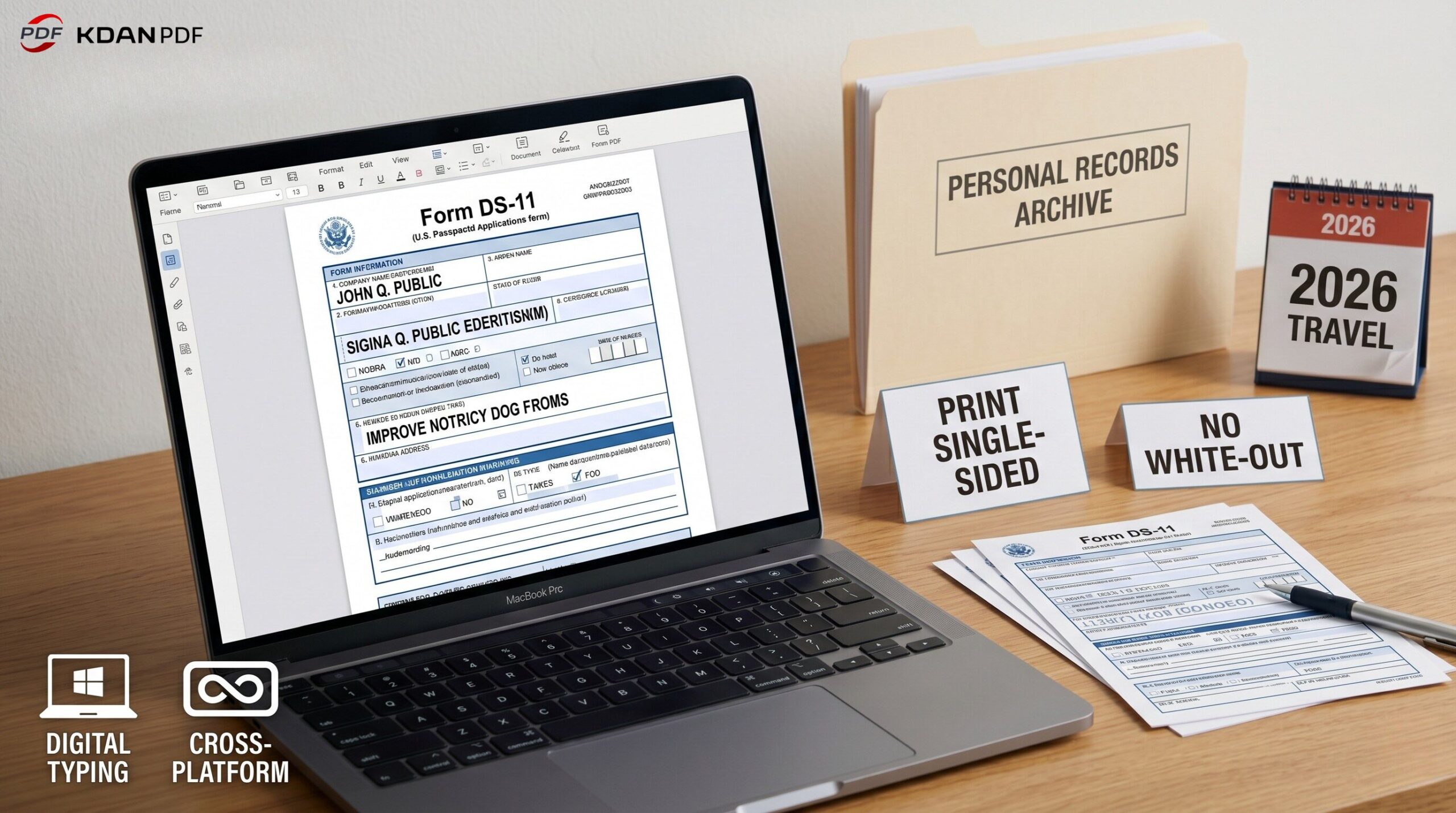
How to Fill Out Form DS-11 for a U.S. Passport in 2026: The Complete Guide
Applying for a new U.S. passport, replacing a lost one, or applying for a minor under 16? You must use Form DS-11 and apply in person at an acceptance facility. To avoid processing delays, follow these strict Department of State rules for your DS-11 application:
- Do not sign the form at home: You must sign the DS-11 in front of a passport acceptance agent.
- Print single-sided: Double-sided DS-11 forms are strictly rejected.
- No White-Out: Correction fluid is prohibited. Type your answers digitally for 100% legibility.
- Bring original documents: You must submit original citizenship evidence and photocopies of your ID.
- Payment: Prepare a check or money order; most facilities do not accept credit cards for the DS-11 execution fee.
【Table of Contents】
- Introduction: Don’t Let Form DS-11 Paperwork Delay Your Travel
- What is Form DS-11?
- Form DS-11 vs. DS-82: Which Passport Form Do You Need?
- Form DS-11 Official Requirements, Fees & Crucial Precautions
- A Section-by-Section Breakdown: How to Fill Out Form DS-11
- Step-by-Step: Managing Your Form DS-11 PDF Using KDAN PDF
- Create a Professional Digital Archive for Your Form DS-11
- Why KDAN PDF Beats Mac-Only Alternatives for Form DS-11
- FAQ: Common Form DS-11 Questions
- Conclusion: Apply for Your Passport with Confidence
1. Introduction: Don’t Let Form DS-11 Paperwork Delay Your Travel
Planning an international trip in 2026? Whether you are heading to Europe for a summer vacation or flying abroad for a business conference, your journey starts with a U.S. passport.
However, getting your hands on that little blue book can be a stressful experience. The U.S. Department of State processes millions of applications each year, and their scanning machines are notoriously unforgiving. A single typo, a scribbled address, or the use of correction fluid (White-Out) on your application can cause your passport to be delayed for months or outright rejected.
Instead of printing a blank form and hoping your handwriting is perfectly neat, the smartest approach is to fill out your passport application digitally before printing it. In this guide, we will introduce you to Form DS-11, compare it with other forms, and provide a comprehensive, step-by-step guide on how to fill it out flawlessly using KDAN PDF.
2. What is Form DS-11?
TheForm DS-11 (Application for a U.S. Passport) is the official government document required for citizens applying for a U.S. passport in person. Unlike a simple renewal form, the DS-11 requires you to swear an oath and sign the document in front of an authorized acceptance agent (such as a postal worker or court clerk) to verify your identity and citizenship.
3. Form DS-11 vs. DS-82: Which Passport Form Do You Need?
It is a common misconception that all passports can be renewed by mail. The U.S. government strictly mandates which form you must use based on your situation.
Here is a quick breakdown to ensure you are using the right form:
| Criteria | Form DS-11 (Apply In-Person) | Form DS-82 (Apply by Mail) |
| First-Time Applicant? | ✅ Yes | ❌ No |
| Age Requirement | Under 16 (or first adult passport) | Adults (16+) renewing a passport |
| Passport Status | Lost, stolen, or severely damaged | Undamaged and in your possession |
| Issue Date of Old Passport | Issued more than 15 years ago | Issued within the last 15 years |
| Name Change | Name changed, no legal proof available | Name is the same, or legal proof provided |
(🔗 Related Reading: Eligible to renew by mail instead? Read our guide onHow to Fill Out a DS-82 Passport Renewal Form PDF.)
4. Form DS-11 Official Requirements, Fees & Crucial Precautions
Showing up unprepared is the leading cause of turned-away applicants. According to official U.S. Embassy andUSA.gov guidelines, here is exactly what you must prepare before submitting your Form DS-11:
1. Crucial Form DS-11 Precautions (Do Not Ignore)
- Black Ink Only: If you write on the printed DS-11 form, use only black ink.
- No White-Out/Correction Fluid: If you make a mistake, do not use White-Out. Draw a single line through the error, or better yet, avoid errors entirely by typing your form digitally.
- Single-Sided Printing: The government will reject double-sided printouts of the DS-11.
2. Required Documents for Form DS-11 (Originals + Photocopies)
- Proof of Citizenship: An original or certified copy of your U.S. birth certificate, Consular Report of Birth Abroad, or Naturalization Certificate.
- Primary ID: A valid government-issued ID (like an in-state driver’s license).
- Photocopies: You must bring a single-sided photocopy of the front and back of your ID and citizenship evidence.
3. Form DS-11 Passport Fees & Payment Methods
You will typically pay two separate fees. Note: Acceptance facilities usually DO NOT accept credit cards for Form DS-11 processing.
- Application Fee (To Dept. of State): Usually $130 for an adult passport book. Must be paid via check or money order.
- Execution Fee (To the Facility): A $35 processing fee, usually payable by check, money order, or cash.
(Check the official Travel.State.Gov Fee Calculator for exact, up-to-date amounts.)
5. A Section-by-Section Breakdown: How to Fill Out Form DS-11
The DS-11 PDF consists of 6 pages, but you only need to fill out and print Pages 5 and 6 (labeled Page 1 and Page 2 of the application).
To ensure your data fits perfectly into the government’s boxes without formatting issues, use a cross-platform editor like KDAN PDF.
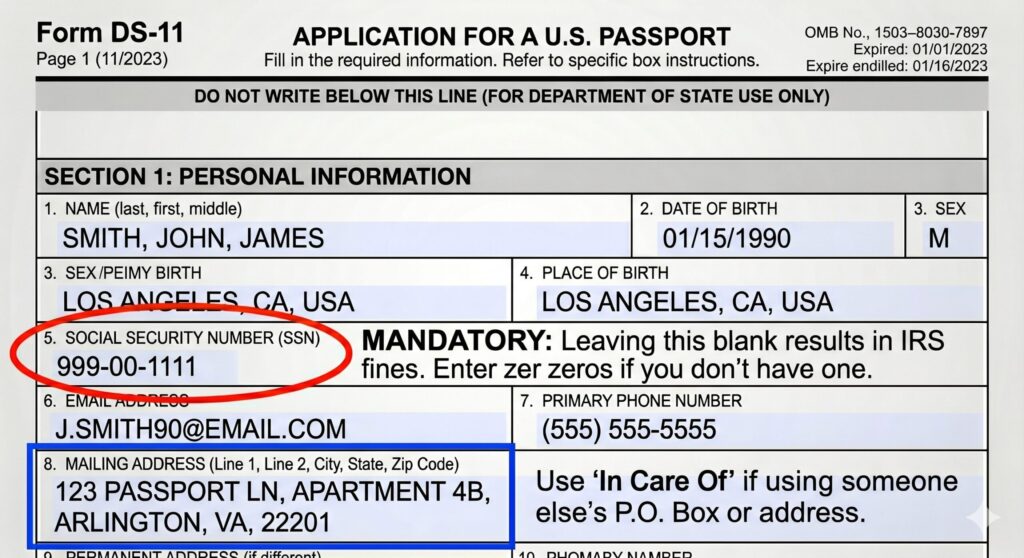
Page 1 of the DS-11 Application
- Boxes 1-4 (Name & DOB): Enter your legal name exactly as it appears on your citizenship evidence.
- Box 5 (Social Security Number): This is mandatory on Form DS-11. Leaving it blank can lead to IRS penalties. If you have never been issued an SSN, you must enter zeros (000-00-0000).
- Box 8 (Mailing Address): This is where your new passport will be shipped. If you use a P.O. Box or someone else’s address, you must fill out the “In Care Of” field.
- Box 9 (Other Names): List your maiden name or previous aliases here.
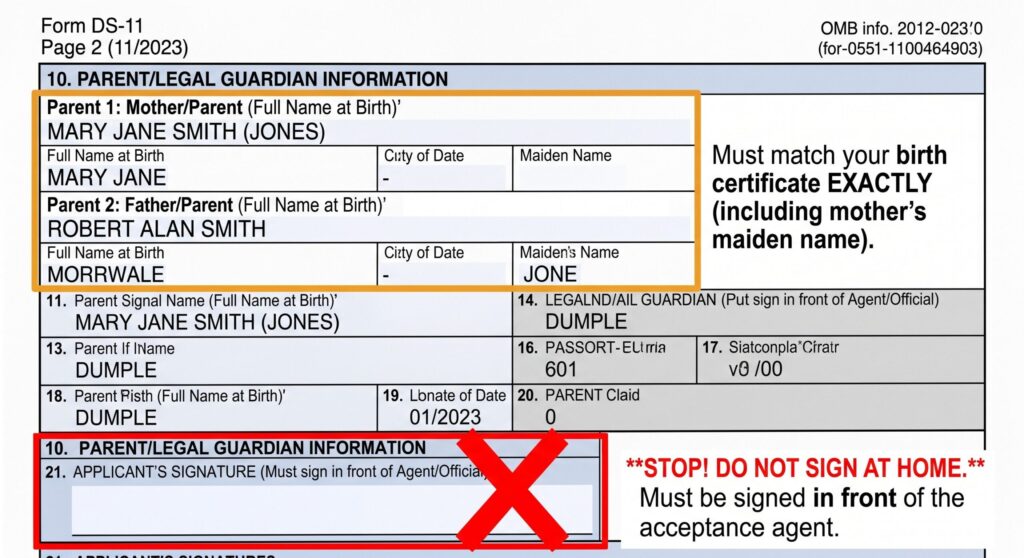
Page 2 of the DS-11 Application
- Box 10 (Parental Information): You must provide your parents’ full birth names (including your mother’s maiden name), exactly as they appear on your birth certificate.
- Boxes 15-17 (Physical Description): Enter your height (in feet and inches), hair color, and eye color.
- Box 18 (Travel Plans): If applying for expedited service, providing your exact departure date helps the agency prioritize your Form DS-11 application.
- Box 21 (STOP! Do Not Sign): Leave the signature block completely blank. You will sign this in person while taking an oath.
6. Step-by-Step: Managing Your Form DS-11 PDF Using KDAN PDF
Typing your application ensures that government scanners can perfectly read your information. Download the official fillable Form DS-11 PDF from the U.S. Department of State website, and use KDAN PDF to simplify the process.
Step 1: Type Your Information Flawlessly (Fill in PDF)
Open the DS-11 in KDAN PDF. Navigate to the Edit menu and click the Fill in PDF tool.
- Action: Type your details into the interactive boxes. KDAN PDF auto-sizes your text to fit perfectly, ensuring a neat and professional look.
(🔗 Academy Guide: Learn how to Fill in PDF forms accurately).
Step 2: Decode Complex Legal Jargon (AI Assistance)
The first four pages of the Form DS-11 contain dense instructions. Don’t waste time Googling passport terms.
- Action: Use the KDAN AI Chatbot directly inside your PDF. Highlight confusing text and ask: “What qualifies as secondary identification?” The AI will instantly summarize the rules.
Step 3: Strip Out the Instruction Pages (Split / Delete Pages)
You only need to print Pages 1 and 2 of the actual application (Pages 5 & 6 of the PDF file). Handing the agent a stack of instruction pages is unnecessary.
- Action: Use the Organize menu to Delete Pages or Split PDF, removing the first 4 instruction pages so you are left with a clean, 2-page document ready for printing.
(🔗 Academy Guides: Learn how to Delete Pages from a PDF or Split PDF).
7. Create a Professional Digital Archive for Your Form DS-11
You will hand over your original citizenship documents to the acceptance agent. While the government will mail these back to you separately, you need a reliable digital backup in case the package gets lost in transit.
1. Digitize and Combine Your Records (Merge PDF)
If you only have physical copies of your IDs, take a clear photo and use the OCR PDF tool to convert them into searchable documents. Then, use the Merge PDF feature to combine your birth certificate scan, ID photocopies, and the blank DS-11 into one “Master Passport Backup Packet.”
(🔗 Academy Guides:OCR PDF and Image to Text|Merge PDF)
2. Establish a Professional Digital Record (Sign PDF)
While the physical Form DS-11 requires a wet-ink signature in front of the agent, keeping an unsigned digital form in your personal archives is confusing. Use the Sign PDF tool to apply a clean, electronic signature to your personal digital backup. This gives your archive a highly professional appearance and provides a finalized record of exactly what you submitted.
(🔗 Academy Guide:Sign PDF)
3. Lock Down Your Identity (Password Protect)
Your DS-11 backup contains your SSN and birth records. Use KDAN PDF’s Password Protect feature to apply enterprise-grade encryption to your master file, keeping your identity safe from unauthorized access on your hard drive.
(🔗 Academy Guide:How to Password Protect a PDF)
8. Why KDAN PDF Beats Mac-Only Alternatives for Form DS-11
When searching for ways to edit Form DS-11, you might come across tutorials for tools like PDF Expert. However, relying on PDF Expert limits you exclusively to Mac and iOS devices.
- True Cross-Platform Freedom: KDAN PDF works seamlessly across Windows, Mac, Android, and iOS. You can start typing your DS-11 on your office Windows PC during your lunch break, and review your scanned birth certificate later on your iPad at home.
- Say Goodbye to Subscription Fatigue: Unlike expensive alternatives that force monthly payments, KDAN offers a Perpetual License. Pay once for lifetime access, ensuring your family’s document management remains secure and affordable for years to come.
9. FAQ: Common Form DS-11 Questions
Q: How long does it take to process Form DS-11?
A: Processing times vary by season. As of late 2025/2026, routine processing typically takes 6 to 8 weeks, while expedited processing (for an additional $60 fee) takes 2 to 3 weeks. You can track your status online at Travel.State.Gov.
Q: Can I apply for my child’s passport using Form DS-11 without the other parent?
A: For minors under 16, both parents must appear in person. If one parent absolutely cannot attend, they must complete a notarized Form DS-3053 (Statement of Consent) and provide a photocopy of their ID front and back.
Q: Do I attach my passport photo to the printed DS-11 form?
A: Yes. Form DS-11 has a designated square for your 2×2 inch photo. You must secure it with four staples in the corners exactly as instructed on the form, or allow the acceptance agent to staple it for you. You can use the Add Image to PDF tool in KDAN PDF to preview how your digital photo fits before printing.
10. Conclusion: Apply for Your Passport with Confidence
Applying for a U.S. passport is the crucial first step toward your next international vacation, study abroad program, or business trip. Don’t let a minor paperwork error—like a double-sided printout, a scribbled address, or a misplaced document—derail your travel plans by months.
By upgrading to KDAN PDF, you are not just filling out Form DS-11; you are taking control of your entire personal document workflow. With KDAN PDF, you can confidently:
- Ensure 100% legibility to avoid frustrating Department of State processing delays.
- Harness built-in AI to quickly decode complex government guidelines.
- Build a secure digital archive of your citizenship evidence with enterprise-grade password protection.
- Work seamlessly across any device (Windows, Mac, iOS, Android) without being locked into expensive, Mac-only monthly subscriptions.
Leave the frustration of messy white-out, clunky web viewers, and restricted software behind. Prepare your application flawlessly, secure your identity, and focus on what really matters: planning your itinerary.
Secure Your Sensitive Personal Data for 2026
Keep your documents safe and protect your sensitive personal data across all devices.
👉 Ready to secure your travel documents and avoid government delays?Download KDAN PDFfor Windows, Mac, iOS, or Android today and make your PDFs work for you.



Connect with KDAN
Follow us to receive all latest updates and promotions.