


 KDAN PDF for Windows
 Lifetime License for Windows
 LynxPDF for Enterprise
 ComPDF SDK
 Edit PDF
 Add Image
 Add Hyperlink
 Annotate PDF
 Fill in PDF
 Rotate & Crop
 Rearrange PDF
 Add Pages
 Delete Pages
 Bates Numbering
 Sign PDF
 Password Protect
 Unlock PDF
 Merge PDF
 Split PDF
 Convert PDF
 OCR PDF
 Compress PDF
 Slideshow Mode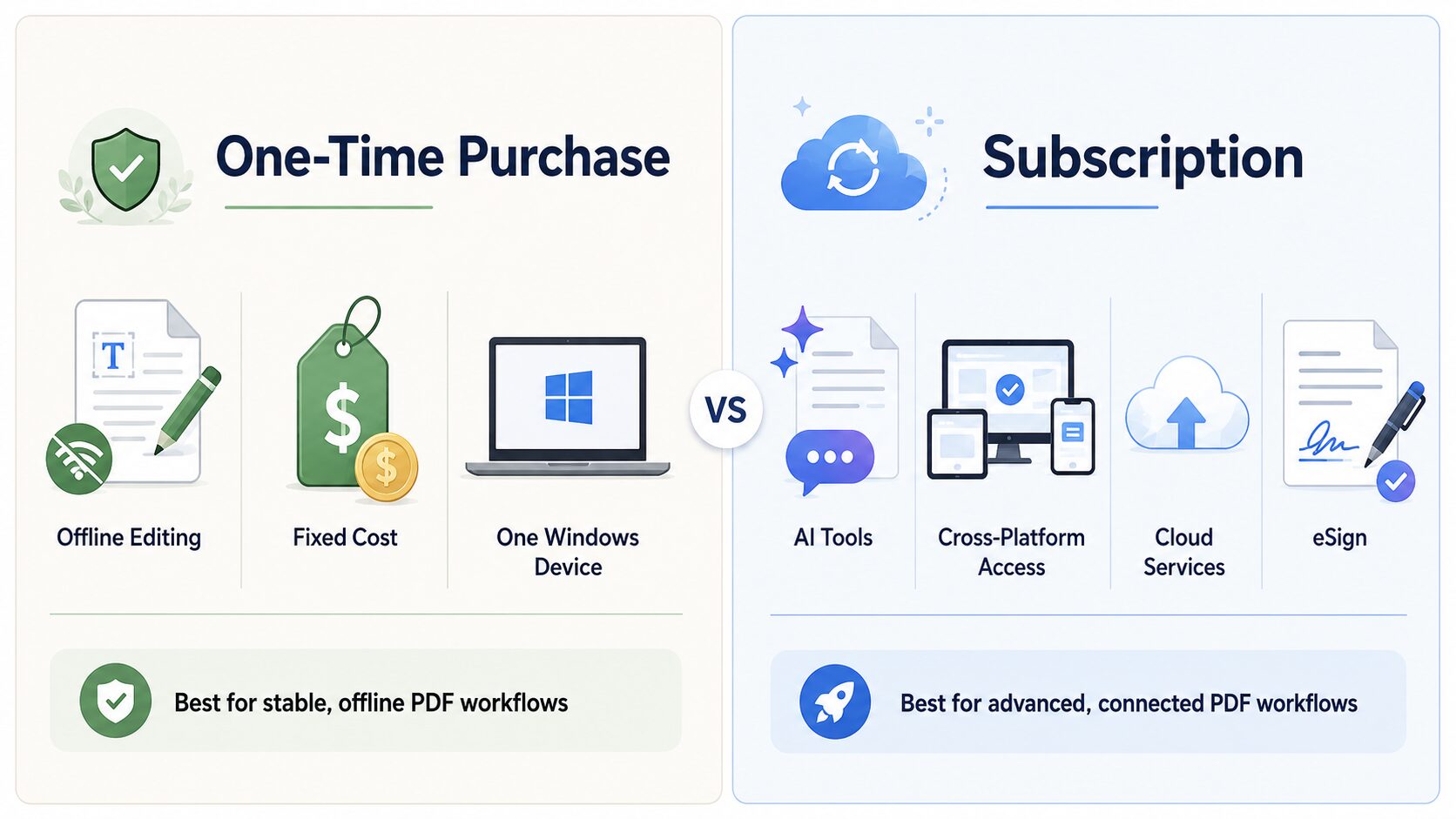
PDF Editor for Microsoft: One-Time Purchase vs. Subscription — Which Is Better for Windows Users in 2026?
Last updated: May 2026 | Reviewed by KDAN PDF product team
Quick Answer:
A one-time purchase PDF editor for Microsoft is best for users who want offline editing, predictable costs, and standard PDF tools on a single Windows device. A subscription PDF editor is better for users who need AI features, OCR, eSign, cloud services, or cross-platform access. KDAN PDF for Windows offers both models on the Microsoft Store, letting users choose based on workflow, budget, and AI needs.
Choosing the right PDF editor for Windows is no longer just about features. It is also about how you want to pay for the tool, how often you work with PDFs, and whether you need advanced capabilities like OCR, AI-powered summaries, document translation, data extraction, or eSign services.
For many Microsoft users, the choice comes down to two pricing models: a one-time purchase PDF editor or a subscription PDF editor. A one-time purchase may be better if you want predictable costs and offline editing. A subscription may be better if you need AI features, cross-platform access, cloud services, or advanced document workflows.
This guide compares both options and helps you decide which type of PDF Editor for Microsoft workflows fits your needs best.
What Is a One-Time Purchase PDF Editor?
A one-time purchase PDF editor is software you pay for once to access a defined set of PDF features. This model is usually best for Windows users who want to avoid recurring fees and mainly need stable, offline PDF tools.
For Windows users, a PDF editor one-time purchase Windows option can be a practical choice if you mostly need to:
- Edit text and images in PDFs
- Fill and sign PDF forms
- Merge or split PDF files
- Rearrange, rotate, extract, or delete pages
- Add annotations, stamps, or handwritten notes
- Protect documents with passwords
- Mostly work offline on one Windows device
The main advantage is cost control. Instead of paying every month or year, you pay once and use the included features based on the license terms.
KDAN PDF for Windows offers a Permanent one-time purchase PDF editor option for users who want offline PDF features on Windows. This plan is designed for users who need a reliable desktop PDF editor for Microsoft workflows but do not require KDAN Cloud, online file conversion, or AI features.
Example Use Case: A Teacher Managing Class Materials on a Windows PC
A teacher may use a PDF editor on a school or personal Windows computer to review class materials, annotate lesson plans, organize student handouts, and manage submitted PDF assignments. These tasks are often repeated throughout the semester and do not always require AI tools or cloud-based services.
In this case, a one-time purchase PDF editor can be a good fit because the workflow is stable and mostly handled on one Windows device.
KDAN PDF for Windows helps teachers to:
- Highlight and annotate teaching materials
- Add sticky notes, text boxes, shapes, and stamps
- Combine multiple handouts into one PDF
- Split large files into smaller class materials
- Rearrange, rotate, or delete pages
- Protect student-related documents with passwords
For educators who mainly need dependable PDF reading, annotation, page organization, and document management on a Windows computer, a one-time purchase PDF editor for Windows can be a cost-effective long-term option.
What Is a Subscription PDF Editor?
A subscription PDF editor is software you pay for monthly, quarterly, or annually. This model is often better for users who need ongoing access to advanced features, AI tools, cloud services, eSign, or cross-platform workflows.
A subscription PDF editor for Microsoft users may be a better fit if you need to:
- Work with PDFs across multiple devices
- Use AI to summarize or understand long documents
- Extract key data or tables from PDFs
- Translate PDF content into different languages
- Convert PDFs online
- Use OCR for scanned documents
- Access advanced security and redaction tools
- Use eSign services
- Receive ongoing feature updates
KDAN PDF offers subscription options such as Document 365 and Document 365 AI+ & eSign. For users who need AI-powered document workflows, the AI+ plan provides access to tools that can help read, analyze, translate, extract, and redact PDF content more efficiently.
Example Use Case: An HR Specialist Managing Resumes and Onboarding Documents
An HR specialist may need to review candidate resumes, organize applicant information, prepare onboarding documents, and collect signed forms from new hires.
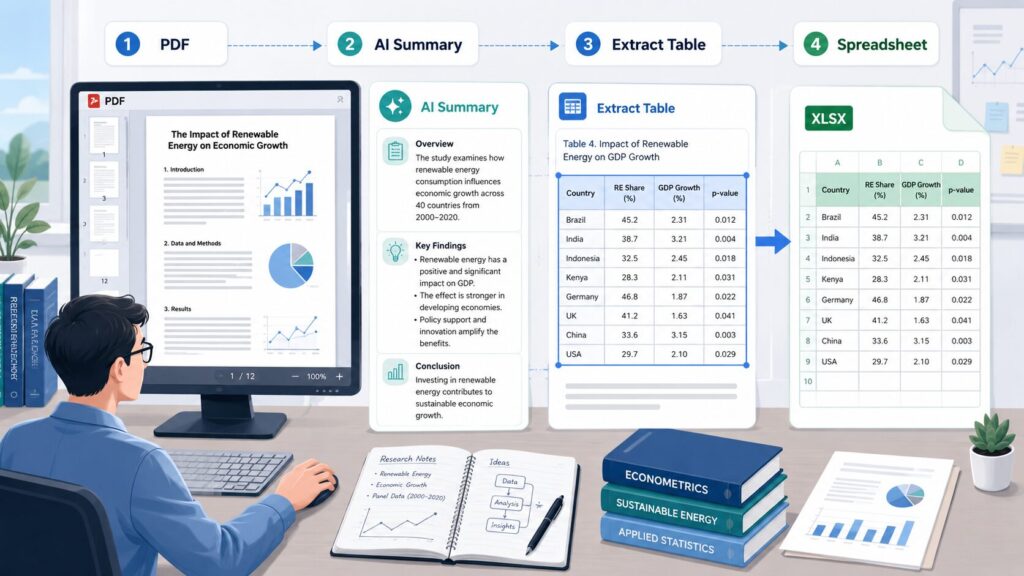
With a subscription plan that includes AI features and eSign services, KDAN PDF helps HR users streamline document-heavy workflows. For example, HR teams can use KDAN PDF AI to extract key information from resumes and export the data into spreadsheets for easier candidate comparison and internal tracking.
With KDAN PDF, HR users can:
- Access PDF tools across different devices
- Use KDAN PDF AI to extract key information from resumes
- Export resume data into spreadsheets for easier organization
- Review and annotate candidate documents
- OCR scanned resumes or employee documents into searchable PDFs
- Redact names, emails, and sensitive information before sharing files internally
- Start an eSign workflow for offer letters, onboarding forms, or employee agreements
For HR professionals who manage high volumes of resumes, employee files, and signed documents, a subscription PDF editor can be worth the recurring cost because it supports AI-powered document processing, cross-device access, and digital signing workflows.
One-Time Purchase vs. Subscription: Quick Comparison
Verdict in one sentence: Choose a one-time purchase PDF editor for stable offline workflows on a single Windows device, and choose a subscription PDF editor for AI, eSign, OCR, and cross-platform needs.
| Factor | One-Time Purchase PDF Editor | Subscription PDF Editor |
| Payment model | Pay once | Pay monthly, quarterly, or yearly |
| Best | Stable, offline PDF workflows | Frequent, advanced, or AI-powered workflows |
| Long-term cost | Easier to control | Can become higher over time |
| AI features | Usually not included | Often available in advanced plans |
| Cloud services | Limited or unavailable | Often included |
| Device access | Usually device-specific | Often more flexible across platforms |
| Updates | May be limited | Usually included while subscribed |
| Best user type | Occasional or individual users | Power users, teams, and professionals |
KDAN PDF for Windows supports both models. Users who want offline PDF editing can choose the Permanent license, while users who need AI tools, online conversion, cross-platform access, or eSign services can choose a subscription plan.
[Image suggestion: A clean comparison table graphic summarizing one-time purchase vs. subscription. Use simple icons for cost, AI, cloud, device, and security.]
Cost Comparison: Which PDF Editor Saves More Money Over Time?
For most Windows users, a one-time purchase PDF editor breaks even after roughly 18-24 months of use compared with a typical subscription plan, depending on usage frequency and feature needs.
A one-time purchase PDF editor usually makes sense when your PDF needs are stable. For example, if you mostly edit text, sign forms, merge files, convert documents, and organize pages, paying once may be more economical over time.
A subscription PDF editor may be more valuable if advanced features save you significant time. For example, AI-powered summaries, data extraction, translation, OCR, redaction, and eSign services can reduce manual work, especially for professionals who handle PDFs every day.
A simple way to compare cost is:
- One-time purchase value = upfront cost compared with long-term usage
- Subscription value = recurring cost compared with the time saved and advanced features used
Total Cost of Ownership: A 3-Year View
Over a 3-year period, the cost difference between a one-time purchase and a subscription depends not only on the price tag but also on the value of features you actually use. Subscription plans typically include AI tools, OCR, online conversion, and cross-platform access — each of which can save several hours of manual work per month for power users.
- One-time purchase: Lowest total cost over time, but limited to the included features at purchase
- Document 365 (subscription): Mid-range total cost, includes cross-platform access and online services
- Document 365 AI+ & eSign (subscription): Highest total cost, but includes AI summaries, AI translation, AI redaction, and eSign — typically the highest productivity return for professionals
Example Use Case: A Small Business Owner Managing Invoices and Vendor Forms
A small business owner may need to fill out vendor forms, sign agreements, convert invoices to Excel, merge receipts into monthly reports, and protect files before sharing them.
If these tasks are mostly offline and repetitive, a one-time purchase PDF editor may be enough. But if the business also needs to extract tables from reports, translate documents, or redact sensitive information, a subscription with AI tools may provide better productivity value. Of course, you can always mix these two payment models.
What PDF Features Do Windows Users Actually Need?
Not every user needs every PDF feature. The right PDF editor for Microsoft choice depends on whether your workflow is basic, professional, or AI-powered.
Essential PDF Editing Features
Most Windows users need a PDF editor that can handle everyday document tasks without friction.
Essential features usually include:
- Reading PDF files
- Editing text and images
- Adding or deleting PDF text
- Filling out PDF forms
- Signing contracts and agreements
- Highlighting, underlining, and striking out text
- Adding sticky notes, shapes, text boxes, and stamps
- Inserting images and hyperlinks
- Merging and splitting PDFs
- Rotating, deleting, extracting, and rearranging pages
- Searching text in PDF files
- Viewing multiple PDFs as tabs
KDAN PDF for Windows supports these everyday PDF editing and viewing tasks, making it a reliable PDF editor for Microsoft-based workflows.
Professional PDF Features
Professional users often need more than basic editing. They may work with scanned files, contracts, financial reports, HR documents, or official forms.
Important professional PDF features include:
- OCR for scanned PDFs
- PDF conversion to Word, Excel, PowerPoint, images, and text
- Password protection
- Permission passwords
- Manual redaction
- AI-powered redaction
- Header, footer, and Bates numbering
- Certificate and signature validation
- Flattening annotations before sharing
- Batch-style document organization
KDAN PDF for Windows includes professional tools for users who need to prepare, secure, convert, and organize business documents.
Windows PDF Editor with AI: AI-Powered PDF Features
A Windows PDF editor with AI can dramatically reduce the time spent reading, copying, translating, or extracting information from long documents. Instead of doing repetitive work by hand, users let AI tools process PDF content in seconds.
AI-powered PDF features can help users:
- Summarize long PDF files
- Ask questions about PDF content
- Extract key data or tables
- Export extracted information into spreadsheets
- Translate documents into multiple languages
- Detect and redact sensitive information
KDAN PDF’s AI features are designed to help users save time on repetitive PDF tasks. AI-powered tools can summarize, translate, and extract data from PDFs in seconds rather than hours, making them especially valuable for high-volume professional workflows.
Choosing a Secure PDF Editor for Windows: Privacy and Document Control
A secure PDF editor for Windows protects sensitive information through password protection, permission controls, redaction, and signature validation. Because PDFs often contain contracts, invoices, tax documents, HR records, legal files, financial reports, and personal data, security should be a core part of any PDF editor decision.
KDAN PDF is designed as a secure and reliable PDF editor for Windows users who work with business documents, contracts, forms, reports, and scanned files. Users can protect PDFs with passwords, set permissions, redact sensitive text, and manage document sharing more safely.
For teams handling confidential information, PDF security features are not optional — they are part of responsible document management.
Microsoft Store PDF Editor: Manage Payment, Subscription, and Renewals
A Microsoft Store PDF editor lets Windows users install, pay, and manage subscriptions directly through their Microsoft account, keeping billing and renewals consistent with other Microsoft services.
For Windows users, the purchase experience matters. Many users prefer to install and manage apps through the Microsoft Store because it keeps payment, subscriptions, and renewals connected to their Microsoft account.
KDAN PDF for Windows supports Microsoft Store purchase and subscription management. Subscriptions purchased through the Microsoft Store are charged through the user’s Microsoft account. Users can also manage their free trial and subscription from their Microsoft account.
This is useful for Windows users who prefer a familiar Microsoft-native billing flow instead of managing payments through a separate platform.
Explore KDAN PDF for Windows on the Microsoft Store: https://apps.microsoft.com/detail/9nblggh67wlk
How KDAN PDF Compares with Other PDF Editors for Microsoft
When evaluating a PDF editor for Microsoft users, the most common alternatives include Adobe Acrobat, Foxit PDF Editor, and Nitro PDF. Each takes a different approach to pricing.
- Adobe Acrobat: Subscription-only model. Strong feature set but no one-time purchase option for individual Windows users.
- Foxit PDF Editor: Offers both perpetual licenses and subscription, but AI features are typically locked behind subscription tiers.
- Nitro PDF: Primarily perpetual license with optional cloud services as add-ons.
- KDAN PDF for Windows: Offers both a one-time purchase (Permanent) and subscription plans (Document 365 and Document 365 AI+ & eSign), available directly through the Microsoft Store with native Microsoft account billing.
KDAN PDF’s distinct advantage is that Microsoft users can choose between a one-time purchase PDF editor and a subscription PDF editor without leaving the Microsoft Store ecosystem — and can switch later as their workflow needs change.
Which PDF Editor Pricing Model Fits Your Use Case?
The best PDF editor pricing model depends on your role, your document workload, and whether you need AI or advanced services.
For Students
Students often need to annotate readings, highlight lecture slides, sign school forms, and convert PDFs for assignments.
A free plan or one-time purchase PDF editor may be enough if the main tasks are reading, annotation, signing, and basic editing. A subscription may be worth considering if the student frequently works with research papers, scanned documents, or multilingual materials.
Useful KDAN PDF features for students include:
- PDF viewing
- Highlights, underlines, sticky notes, and text boxes
- Digital signatures
- PDF conversion
- AI summaries for long readings
- AI Translate for research materials
- OCR for scanned handouts
Best fit: Free plan, one-time purchase, or AI subscription depending on workload.
For Freelancers
Freelancers often work with proposals, contracts, invoices, client forms, and project documents. They need a PDF editor that can handle editing, signing, conversion, and file organization.
A one-time purchase PDF editor may be suitable if the freelancer’s document workflow is stable. A subscription may be better if they manage many client documents, need AI assistance, or work across multiple platforms.
Useful KDAN PDF features for freelancers include:
- Edit PDF text and images
- Fill and sign forms
- Merge and split PDFs
- Convert PDFs to Word, Excel, PowerPoint, and images
- Password-protect client documents
- Compress PDFs before sending
Best fit: One-time purchase for predictable workflows; subscription for heavier client work.
For Lawyers and Legal Teams
Legal professionals need accuracy, security, and document control. They may need to prepare contract packets, redact confidential clauses, validate signatures, add Bates numbering, and send secure files.
A one-time purchase can be useful for offline document editing and control. A subscription may be better if the team needs AI redaction, cross-platform access, or eSign services.
Useful KDAN PDF features for legal users include:
- Manual and AI-powered redaction
- Bates numbering
- Permission passwords
- Signature and certificate validation
- Annotation flattening
- PDF merging and page organization
- Contract signing
Best fit: Professional plan or subscription, depending on the need for AI and eSign.
For HR Professionals
HR teams often work with resumes, onboarding forms, employee records, policy documents, and confidential personal information.
A subscription PDF editor with AI features can be especially useful if HR users need to redact personal data, translate documents, or process a high volume of candidate files.
Useful KDAN PDF features for HR include:
- AI-powered text redaction
- AI Translate
- OCR for scanned documents
- Fill and edit PDF forms
- Combine and organize pages
- Share flattened PDFs
Best fit: Subscription with AI features for high-volume HR workflows.
For Sales Teams
Sales teams often need to prepare proposals, customize pricing documents, sign agreements, and send files to prospects quickly.
A one-time purchase may work for occasional proposal editing. A subscription may be better for teams that frequently update documents, use eSign, or need advanced conversion and collaboration features.
Useful KDAN PDF features for sales teams include:
- Edit proposal text and images
- Insert hyperlinks
- Add signatures
- Rearrange, delete, and extract pages
- Compress files before sharing
- Convert PDFs to Office formats
Best fit: One-time purchase for individual users; subscription for active sales teams.
For Researchers
Researchers often work with long PDFs, scanned papers, multilingual references, tables, and data-heavy reports.
For this workflow, a subscription with AI features is usually more valuable because it can reduce the time spent reading, translating, extracting, and organizing information.
Useful KDAN PDF features for researchers include:
- Read PDFs with AI
- Summarize long documents
- Extract key data and tables
- Export data as spreadsheets
- AI Translate
- OCR with 50+ supported languages
- View multiple PDFs as tabs
Best fit: Subscription with AI features.
When Should You Choose a One-Time Purchase PDF Editor?
Choose a one-time purchase PDF editor if you want a stable tool for regular PDF tasks without recurring payments.
This model is a good fit if:
- You want to avoid monthly or annual fees
- You mainly work on one Windows device
- You need offline PDF editing
- Your PDF workflow is predictable
- You mostly edit, sign, convert, merge, split, and organize PDFs
- You do not need AI features, cloud conversion, or eSign services
KDAN PDF for Windows Permanent — a true PDF editor one-time purchase Windows option — is designed for users who want access to offline PDF features through a one-time payment. It is a practical choice for users who need a reliable PDF editor for Windows but do not require KDAN Cloud, online file conversion, AI features, or cross-platform subscription benefits.
When Should You Choose a Subscription PDF Editor?
Choose a subscription PDF editor if your PDF workflow is frequent, advanced, or connected to multiple tools and devices.
This model is a good fit if:
- You work with PDFs every day
- You need AI-powered reading, translation, extraction, or redaction
- You need OCR, PDF security, conversion, or page management
- You want cross-platform access
- You need eSign services
- You prefer ongoing access to advanced features
- You want to manage your plan through your Microsoft account
KDAN PDF’s subscription plans are suitable for users who need more than offline PDF editing. Document 365 supports access across different platforms, while Document 365 AI+ & eSign adds AI features and eSign services for users who want a more complete PDF workflow.
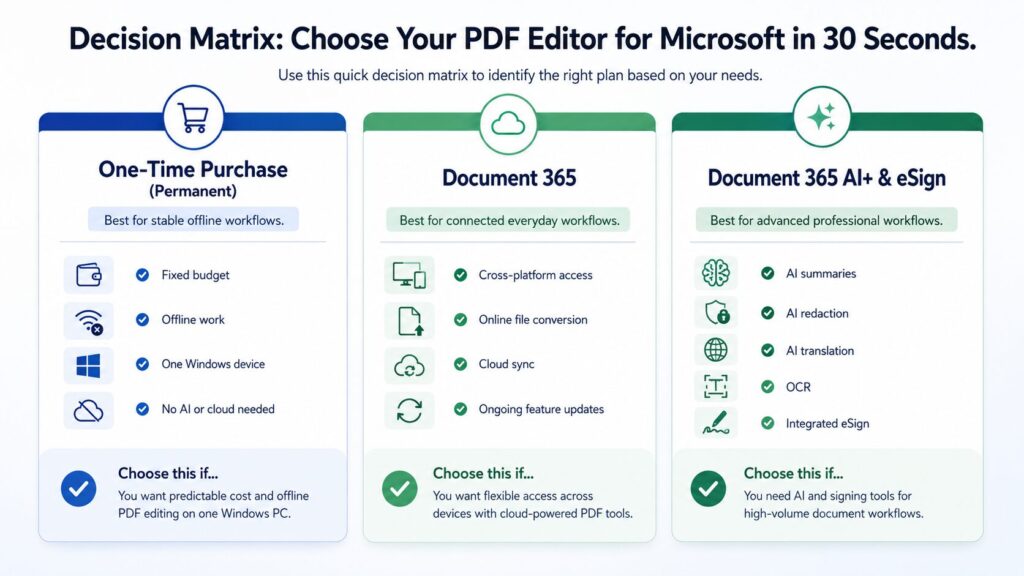
Decision Matrix: Choose Your PDF Editor for Microsoft in 30 Seconds
Use this quick decision matrix to identify the right plan based on your needs:
- Choose One-Time Purchase (Permanent) if: budget is fixed, work is offline, you use a single Windows device, and you do not need AI or cloud services.
- Choose Document 365 (subscription) if: you need cross-platform access, online file conversion, cloud sync, and ongoing feature updates.
- Choose Document 365 AI+ & eSign (subscription) if: you need AI summaries, AI redaction, AI translation, OCR, and integrated eSign for high-volume professional workflows.
Hidden Costs to Check Before Choosing a PDF Editor for Windows
Before choosing a PDF editor, look beyond the headline price. Different tools may include different features, update policies, device limits, and service restrictions.
Here are important questions to ask:
- Is it a one-time purchase, subscription, or fixed-term license?
- Does the one-time purchase include major updates?
- Does the plan include AI features?
- Are online conversion and cloud services included?
- How many devices or platforms are supported?
- Does it support OCR?
- Can it convert PDFs to Word, Excel, PowerPoint, text, and images?
- Can it redact sensitive information?
- Does it support password protection?
- Can you manage billing through your Microsoft account?
- Are free trials and renewals easy to manage?
For KDAN PDF for Windows, the difference is clear: the Permanent plan gives users offline Windows PDF features through a one-time purchase, while subscription plans are better for users who need cross-platform access, online services, AI features, or eSign.
Final Verdict: Which PDF Editor Is Better for Windows Users?
The best PDF editor for Microsoft users depends on how often you work with PDFs and which features you actually need.
A one-time purchase PDF editor is usually better if you want predictable cost, offline editing, and reliable standard PDF tools. It is ideal for users who mostly edit, sign, convert, merge, split, and organize PDFs on one Windows device.
A subscription PDF editor is usually better if you need AI-powered summaries, data extraction, translation, redaction, OCR, eSign, online services, or cross-platform access. It is especially useful for professionals who handle complex or high-volume PDF workflows.
KDAN PDF for Windows gives Microsoft users both choices. You can choose a one-time purchase for offline Windows PDF editing, or upgrade to a subscription plan for AI tools, cross-platform access, and advanced document workflows.
Try KDAN PDF for Windows
Looking for a flexible PDF Editor for Microsoft? KDAN PDF for Windows lets you read, edit, sign, convert, secure, and organize PDFs with ease.
Choose a one-time purchase for offline Windows PDF editing, or upgrade to a subscription plan for AI tools, cross-platform access, and advanced document workflows.
Get KDAN PDF for Windows on the Microsoft Store:

FAQ
Is a one-time purchase PDF editor worth it for Windows users?
Yes, a one-time purchase PDF editor is worth it for Windows users who need offline PDF editing, predictable cost, and standard tools such as editing, signing, converting, merging, splitting, and organizing PDFs on a single Windows device.
Is a subscription PDF editor better than a one-time purchase?
A subscription PDF editor is better than a one-time purchase when you need advanced features such as AI summaries, AI translation, OCR, online conversion, eSign, cloud services, or cross-platform access across multiple devices.
Does KDAN PDF for Windows offer a one-time purchase?
Yes, KDAN PDF for Windows offers a Permanent one-time purchase option for users who want offline PDF features on Windows without recurring fees.
Does KDAN PDF for Windows offer a subscription?
Yes, KDAN PDF offers subscription plans, including Document 365 and Document 365 AI+ & eSign. Subscription users can access advanced features depending on the selected plan.
Does the one-time purchase version include AI features?
No, the KDAN PDF for Windows Permanent (one-time purchase) plan does not include KDAN Cloud, online file conversion, or AI features. Users who need AI tools should choose a subscription plan such as Document 365 AI+ & eSign.
Can I manage KDAN PDF subscriptions through my Microsoft account?
Yes, subscriptions purchased through the Microsoft Store are charged through your Microsoft account. Users can manage their free trial and subscription directly from their Microsoft account.
What is the best PDF editor for Microsoft users?
The best PDF editor for Microsoft users depends on the workflow. Users who need offline editing may prefer a one-time purchase such as KDAN PDF for Windows Permanent, while users who need AI, eSign, OCR, online services, or cross-platform access may prefer a subscription such as Document 365 AI+ & eSign.
Is the PDF editor one-time purchase Windows version updated regularly?
The KDAN PDF for Windows Permanent (one-time purchase) plan provides access to the included PDF features on Windows. For ongoing major feature updates, AI capabilities, cloud services, and cross-platform access, a subscription plan is recommended.
 Windows
  Mac
Mac  iOS
iOS  Android



Connect with KDAN
Follow us to receive all latest updates and promotions.