


 KDAN PDF for Windows
 Lifetime License for Windows
 LynxPDF for Enterprise
 ComPDF SDK
 Edit PDF
 Add Image
 Add Hyperlink
 Annotate PDF
 Fill in PDF
 Rotate & Crop
 Rearrange PDF
 Add Pages
 Delete Pages
 Bates Numbering
 Sign PDF
 Password Protect
 Unlock PDF
 Merge PDF
 Split PDF
 Convert PDF
 OCR PDF
 Compress PDF
 Slideshow Mode
KDAN PDF vs. Foxit PDF Editor: Which is the Best Cost-Effective Alternative in 2025?
Finding the right PDF solution often comes down to balancing power with price. While Foxit PDF Editor is a recognized industry giant for enterprise compliance, many professionals find themselves paying for complex features they never use.
Enter KDAN PDF—a robust Foxit alternative designed for agility. If you are a freelancer, educator, or SMB owner looking to cut costs without sacrificing functionality, this comparison aims to show why KDAN might be the smarter, more user-friendly choice for your workflow.
This article explores how KDAN PDF delivers a more user-friendly and adaptable experience compared to Foxit’s enterprise-oriented structure, helping readers choose the right tool based on their work style and document management needs.
Core Feature Comparison
KDAN PDF – Core Features
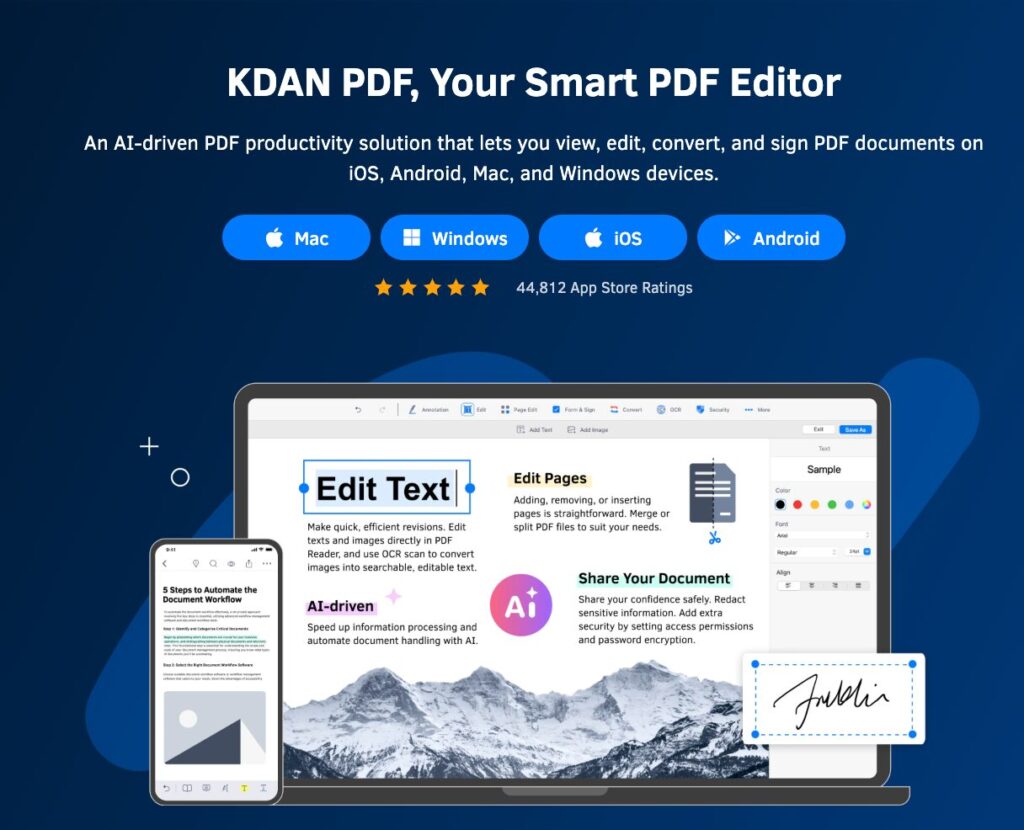
KDAN PDF is tailored for users who value simplicity and efficiency in document handling. It combines essential editing tools with a user-friendly interface that supports seamless productivity.
- Ease of Use: Clean, intuitive design suitable for quick edits and annotations.
- Editing & Conversion: Easily modify text, add images, or convert files between formats.
- Cross-Device Workflow: Access and sync documents through Kdan Cloud for mobile and desktop use.
- OCR & Productivity Tools: Turn scanned files into searchable text for faster document management.
KDAN PDF is ideal for professionals, educators, and small teams who prioritize flexibility and accessibility.
Foxit PDF Editor – Core Features

Foxit PDF Editor is built for enterprise users who require advanced collaboration and security features. Its robust system supports detailed control over document workflows.
- Advanced Review Tools: Includes commenting, tracking, and approval workflows.
- Enterprise Security: Offers password protection, redaction, and digital signature management.
- Compliance Support: Integrates with business systems for policy control and audit trails.
- Deployment Flexibility: Suitable for large organizations needing multi-user licensing and IT integration.
Foxit PDF Editor is best suited for corporations or institutions that focus on compliance, governance, and formal document processes.
Summary Comparison
While both KDAN PDF and Foxit deliver strong editing and annotation capabilities:
- KDAN PDF emphasizes simplicity, cross-device access, and cloud integration.
- Foxit focuses on enterprise-level control, compliance, and document governance.
Try the Smart Foxit Alternative
Get powerful PDF editing without the complexity. Start your KDAN PDF free trial and simplify your workflow today!
Document Management & Security
KDAN PDF – Document Management & Security
KDAN PDF emphasizes convenience and organization in everyday document handling. It provides users with intuitive tools to manage, search, and protect their files across multiple devices.
- Smart Organization: Use tagging, folder management, and quick search to locate files instantly.
- KDAN Cloud Integration: Sync documents across mobile, tablet, and desktop, ensuring access anytime, anywhere.
- Secure File Handling: Protect sensitive information with password-protected PDFs and controlled sharing options.
- User Privacy Focus: Balances accessibility with security, giving individuals and small teams confidence in managing private files.
KDAN PDF’s approach centers on making document organization seamless while maintaining practical levels of protection—ideal for professionals who value both efficiency and peace of mind.
Foxit PDF Editor – Document Management & Security
Foxit PDF Editor focuses on enterprise-level document control, offering advanced features for organizations that handle confidential or large-scale data.
- Enterprise Security: Provides robust encryption, digital signatures, and redaction tools to safeguard corporate information.
- Administrative Control: Enables centralized management of user permissions, workflows, and document access policies.
- Compliance and Integration: Supports regulatory standards and integrates with enterprise systems for secure collaboration.
- Scalable Deployment: Designed for IT administrators who need to manage multiple users and maintain strict compliance environments.
Foxit’s security-first design makes it a strong choice for corporations requiring comprehensive control, compliance, and multi-user governance.
User Value & Pricing
KDAN PDF – Flexible and Cost-Effective
KDAN PDF offers strong value for its price, combining professional features with accessible pricing options.
- Affordable Plans: Available as a one-time purchase or annual subscription at $59.99/year, making it suitable for freelancers, educators, and small teams.
- All-in-One Functionality: Includes editing, annotation, OCR, and batch processing—features often found in more expensive software.
- High Cost-Performance Ratio: Delivers professional capabilities at nearly one-third the cost of Foxit, offering users an excellent balance of power and affordability.
KDAN PDF stands out for providing comprehensive tools without the enterprise-level price tag, making it an ideal choice for those seeking a reliable, long-term PDF solution.
Foxit PDF Editor – Enterprise-Level Investment
Foxit PDF Editor is positioned toward business and corporate users who need advanced administrative and compliance functions.
- Pricing: Starts at $159.99/year, reflecting its focus on enterprise deployment, IT integration, and system-wide management.
- Target Users: Designed for organizations that require formal security controls, user permission management, and workflow automation.
While Foxit excels in enterprise environments, KDAN PDF delivers greater overall value for individuals and small teams who prioritize flexibility and affordability.
Full Comparison: KDAN PDF vs. Foxit PDF Editor
| Category | KDAN PDF | Foxit PDF Editor |
| Overview | Designed for professionals, educators, and small teams seeking a simple yet powerful PDF solution with high cost-performance and cross-device access. | Geared toward enterprises and organizations that require large-scale deployment, workflow control, and advanced security compliance. |
| Editing & Annotation | Offers direct text and image editing, page rearrangement, merging, and splitting. Annotation tools include highlights, comments, stamps, and handwriting support for collaborative use. | Provides comprehensive editing, redaction, and version comparison tools with enterprise-oriented annotation and review workflows. |
| Document Management & Sync | Features tagging, search, OCR, and Kdan Cloud synchronization for convenient file organization and access across devices. | Supports enterprise management, centralized workflow control, and multi-user collaboration through business integrations. |
| Security & Compliance | Includes file encryption, password protection, and digital signature features for everyday privacy needs — lightweight yet reliable. | Offers enterprise-grade encryption, redaction tools, digital signatures, and user permission control for strict compliance environments. |
| User Value & Pricing | $59.99/year (subscription) or lifetime license option. Delivers robust functionality and cross-platform support at a fraction of the cost — ideal for freelancers and small teams. | $159.99/year (starting price). Reflects enterprise-level tools, IT integration, and administrative deployment features. |
| Best For | Educators, creative professionals, freelancers, and small businesses looking for flexibility, affordability, and ease of use. | Large corporations, legal and financial institutions, and organizations requiring strict governance and compliance. |
| Key Strengths | High cost-performance, intuitive interface, cross-device access, and efficient all-in-one functionality. | Enterprise workflow management, strong security, and compliance control. |
FAQ
A: Yes, KDAN PDF is considered one of the best cost-effective alternatives to Foxit, offering core editing and OCR features at roughly 30% of the cost.
A: Absolutely. KDAN allows you to edit text, images, and pages just as easily as Foxit, with a more intuitive interface for non-technical users.
A: Yes, KDAN supports OCR (Optical Character Recognition) to convert scanned PDFs into searchable, editable text.
Conclusion
Both KDAN PDF and Foxit PDF Editor stand out as reliable, feature-rich PDF solutions, but they cater to different types of users and priorities.
KDAN PDF offers an intuitive interface, affordable pricing, and seamless cross-device workflow—making it a top choice for individuals, educators, and small teams seeking efficiency and flexibility. In contrast, Foxit PDF Editor is tailored for enterprises that require advanced administrative control, compliance management, and large-scale deployment.
Final Thoughts: Which Tool Should You Choose?
- Choose Foxit PDF Editor if: You represent a large corporation requiring strict ISO compliance, IT-managed deployment, and complex redaction workflows.
- Choose KDAN PDF if: You need a lightweight, fast, and affordable PDF editor that handles 95% of daily tasks (Edit, Sign, OCR) seamlessly across Mac, Windows, and Mobile.
Ready to streamline your workflow? Start your free trial with KDAN PDF today and experience the difference.
Save 60%+ on Your PDF Workflow
Stop overpaying. Get full editing power for a fraction of the cost. Switch to KDAN PDF now.



Connect with KDAN
Follow us to receive all latest updates and promotions.