


 KDAN PDF for Windows
 Lifetime License for Windows
 LynxPDF for Enterprise
 ComPDF SDK
 Edit PDF
 Add Image
 Add Hyperlink
 Annotate PDF
 Fill in PDF
 Rotate & Crop
 Rearrange PDF
 Add Pages
 Delete Pages
 Bates Numbering
 Sign PDF
 Password Protect
 Unlock PDF
 Merge PDF
 Split PDF
 Convert PDF
 OCR PDF
 Compress PDF
 Slideshow Mode
How to Speed Up Your Hiring Workflow: The Smarter Adobe Acrobat Alternative for HR
Which is better for HR professionals?
For HR teams, KDAN PDF is the more practical and cost-effective Adobe Acrobat alternative. It covers the tools HR actually relies on, solid text editing and electronic signature workflows, without the price tag that comes with everything else Adobe bundles in.
Human Resources runs on documents, and a single error in an offer letter, handbook, or compliance form can stall a hire or create a compliance headache. For a lot of HR teams, the search for an Adobe Acrobat alternative starts with one simple frustration: why are we paying this much for features we never open?
Where HR Teams Actually Need PDF Text Editing
PDF editing in HR conversations usually starts with offer letters. But anyone who has worked in HR knows the list goes much further than that.
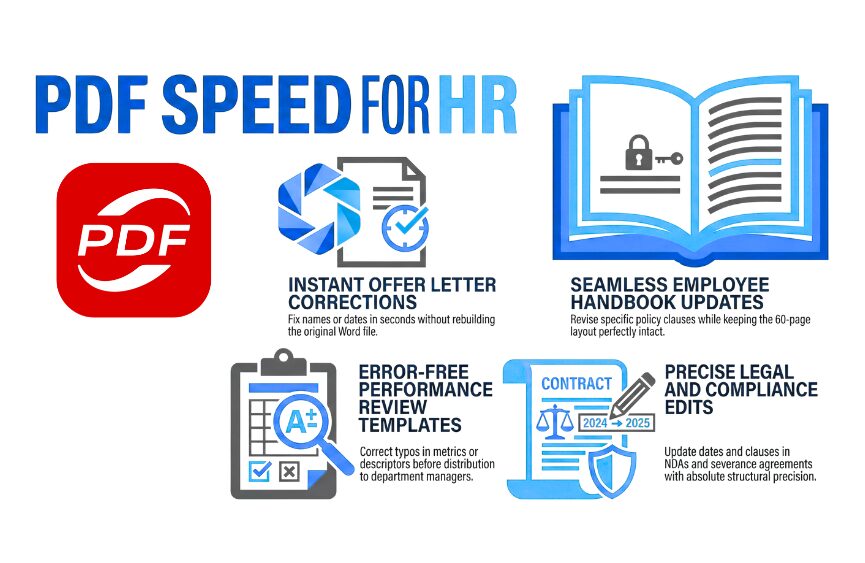
Offer Letters
The offer is ready, the candidate is excited, and then you catch a wrong start date or a misspelled name. Going back to the original Word file, fixing it, re-exporting, and cleaning up the formatting is the kind of interruption that throws off an entire afternoon. Editing directly in the PDF takes seconds.
Employee Handbooks
Nobody wants to rebuild a sixty-page handbook from scratch because one policy clause changed. Whether you are updating an effective date, revising a remote work section, or adjusting leave language, working directly in the PDF keeps your formatting intact and your afternoon free.
Performance Review Templates
When a standardized form goes out to a dozen department managers, one typo (a mislabeled metric or a garbled rating descriptor) becomes everyone’s problem. A quick fix before distribution is always worth it.
Compliance and Training Materials
Regulations shift, OSHA guidelines get revised, and state leave laws do not stay static. Internal compliance documents need to keep pace, and that means making targeted edits without overhauling the entire file.
Severance Agreements and NDAs
These documents need to look exactly right. The letterhead, the structure, the legal language all have to stay in place while you adjust a date or update a specific clause. Precision matters here more than anywhere else.
Adobe Acrobat vs. KDAN PDF: What HR Teams Actually Need to Know
Adobe Acrobat: Powerful, But Built for a Different Audience
Adobe Acrobat earned its reputation. It is a genuinely capable tool that handles an enormous range of PDF tasks. But that range is exactly the issue for HR teams. The interface is built around a feature set that serves designers, print professionals, and enterprise IT departments, and navigating it just to fix a sentence is more work than it should be.
The pricing reflects that same audience. Adobe Acrobat Studio, the highest-tier individual plan, runs $24.99 per month on an annual commitment, which comes out to $299.88 per year. For a team whose day-to-day needs are editing text and collecting signatures, that is a hard number to justify.
KDAN PDF: A Focused Adobe Acrobat Alternative Built for Getting Things Done
KDAN PDF is not trying to do everything. It is trying to do the right things well. For HR professionals, the editing workflow is about as straightforward as it gets:
- Click Edit in the main toolbar.
- Click on the text you want to change.
- Type your correction.
The software matches the existing font, size, and formatting automatically, so your documents come out looking exactly as they should.
On the cost side, the Document 365 AI+ & eSign plan comes in at $109.99 per year, less than half of what Adobe Acrobat Studio costs. It bundles professional PDF editing with an electronic signature workflow in one plan, and that is a number most HR teams can actually defend in a budget conversation. For teams looking to equip more than one person, it makes the conversation a lot simpler than negotiating per-license costs with Adobe.
Get HR Documents Done Without the Acrobat Price Tag
KDAN PDF covers everything HR teams actually use, text editing, format matching, and e-signing, all in one plan starting at $109.99/year. Available on Windows, Mac, Android, and iOS.
How They Stack Up: HR Document Editing
| Adobe Acrobat Studio | KDAN PDF: Document 365 AI+ & eSign | |
| Annual Cost | $299.88/year | $109.99/year |
| Direct Text Editing | Yes (multi-step interface) | Yes (single-click Edit Mode) |
| Learning Curve | Moderate to High | Low |
| Free Trial | 7-day trial | 7-day trial with occasional promotional discounts |
| Customer Support | Standard support channels | Transparent, responsive support contact |
| Best Fit | Enterprise design and IT teams | HR, operations, and administrative teams |
From Edits to Signatures, All Within One Workflow
Fixing the document is step one. Getting it signed is step two. Once your offer letter or NDA is finalized in KDAN PDF, you can launch an electronic signature workflow directly from the app. For HR teams managing multiple open positions or sending out company-wide policy acknowledgments, having a PDF editor and e-signature solution that work together makes the whole process feel a lot less like juggling.
Learn more about KDAN PDF’s electronic signature workflows
FAQ
What is the best Adobe Acrobat alternative for HR teams?
For HR professionals who primarily need to edit offer letters, handbooks, and compliance documents, KDAN PDF is a strong Adobe Acrobat alternative. It covers direct text editing with automatic font and format matching, a built-in e-signature workflow, and responsive customer support. The Document 365 AI+ & eSign plan is $109.99 per year, less than half the cost of Adobe Acrobat Studio.
Can I edit text in a PDF without going back to the original Word file?
Yes. KDAN PDF lets you click directly into any text block and type your correction without touching the source file. The software automatically preserves the existing font, size, and layout, so your documents stay professionally formatted throughout.
How much does Adobe Acrobat cost compared to KDAN PDF?
Adobe Acrobat Studio, the highest-tier individual plan, costs $299.88 per year. KDAN PDF’s Document 365 AI+ & eSign plan is $109.99 per year. For HR professionals who do not need Adobe’s full design and enterprise feature set, that difference is hard to ignore.
Is KDAN PDF suitable for freelance HR consultants?
Yes. KDAN PDF works well for HR professionals, operations staff, and independent consultants who need to handle documents efficiently. The Document 365 AI+ & eSign plan is $109.99 per year, and a 7-day free trial is available so you can try it before committing.
Does KDAN PDF support electronic signatures for employment documents?
Yes. Once your document is finalized in KDAN PDF, you can launch an electronic signature workflow directly from the app. This applies to common HR documents including offer letters, NDAs, and company-wide policy acknowledgments.
What kind of customer support does KDAN PDF offer?
KDAN PDF offers direct and transparent customer support. When you sign up and start your free trial, you will receive a confirmation email with a direct contact address for the support team. Whether you have questions during the trial or after purchase, help is straightforward to find.
Stop Paying for a Tool That Does More Than You Need
If your team is spending $299.88 a year on software just to fix a date or correct a name in a PDF, something is off. KDAN PDF gives you direct text editing and integrated electronic signatures, the two things HR teams actually use, for $109.99 per year.
Try KDAN PDF Free for 7 Days
See how KDAN PDF handles your HR documents before you commit. Edit offer letters, handbooks, and compliance forms with full feature access, no credit card required to start.



Connect with KDAN
Follow us to receive all latest updates and promotions.