


 KDAN PDF for Windows
 Lifetime License for Windows
 LynxPDF for Enterprise
 ComPDF SDK
 Edit PDF
 Add Image
 Add Hyperlink
 Annotate PDF
 Fill in PDF
 Rotate & Crop
 Rearrange PDF
 Add Pages
 Delete Pages
 Bates Numbering
 Sign PDF
 Password Protect
 Unlock PDF
 Merge PDF
 Split PDF
 Convert PDF
 OCR PDF
 Compress PDF
 Slideshow Mode
Why HR Switch from Adobe Acrobat to KDAN PDF for Audit-Ready Docs
Your auditor just requested complete personnel files for ten employees by the end of the week. The signed contracts are in email. The onboarding forms are in a shared drive no one has organized in months. The background check results are somewhere else entirely.
This is what fragmented HR documentation costs you: time you don’t have, under pressure you can’t afford.
The fix isn’t more storage. It’s a smarter filing standard, the Centralized Personnel Record (CPR). This is a single, searchable, audit-ready PDF that captures an employee’s full lifecycle in one place. Here’s how to build one, and why KDAN PDF is the most practical tool for lean HR teams.
Quick Answer for HR Professionals
For lean HR teams, KDAN PDF delivers the core tools to build audit-ready personnel files (merging, splitting, rearranging, and more) at $59.99/year, versus Adobe Acrobat Pro’s $239.88/year. Page management functions are processed locally on your device, so the employee documents you work with most stay within your controlled environment. That’s a meaningful advantage for any team managing documents under internal data governance policies.
Why Scattered Files Are a Liability
When a personnel file lives across email threads, cloud folders, and local desktops, you’re not filing; you’re gambling. One missing document during an audit or employee dispute can derail a review that should take minutes.
The Centralized Personnel Record standard solves this by consolidating every stage of an employee’s documentation into a single master PDF. Version control is automatic. Retrieval is instant. When an auditor asks for a file, you produce one document, not a folder full of fragments.
Core Page Editing Features Every HR Team Needs
KDAN PDF provides these focused functions to support HR document workflows:
- Merge: Combine job applications, offer letters, and signed contracts into one consolidated file during onboarding. No more hunting for individual forms when you need them.
- Append Page: Add ongoing records, such as performance reviews, role change confirmations, and training certificates, to an existing employee file as they accumulate.
- Rearrange: Reorder pages to match your internal audit checklist or a sequence requested by an external reviewer, without rebuilding the document from scratch.
- Split: Extract a specific section from a large file to share with an employee or reviewer, without distributing the full document.
- Delete: Remove blank pages, duplicate scans, and outdated drafts before finalizing a file. Clean documentation signals a disciplined recordkeeping process.
Two Workflows That Save HR Teams the Most Time
Onboarding: From Day One to Audit-Ready
A new hire’s first week generates a high volume of documents arriving through different channels at different times. Without a consolidation step, they scatter.
With KDAN PDF’s Merge and Append functions, each document gets added to the employee’s master PDF as it arrives, in the correct position, from day one. By the end of the week, the file is already audit-ready. No reconstruction required later.
Sensitive Data: Maintaining Clear Access Boundaries
Not every reviewer needs access to every part of a personnel file. Medical accommodation notes, personal financial details, and similar sensitive records should be maintained separately from the general employment record, both for data governance reasons and as a matter of basic operational hygiene.
The Split tool makes it straightforward to extract sensitive pages into a separate, access-controlled document. A hiring manager reviewing performance history has no reason to open a file containing medical notes. Keeping them physically separate is a cleaner and more defensible boundary than relying on folder permissions alone.
Why Free Online PDF Tools Are a Risk for HR
Free web-based PDF tools require you to upload files containing employee PII (names, ID scans, and financial details) to servers you don’t control.
The problem goes beyond the upload. Many free platforms retain file data in temporary storage long after the session ends (retention creep). You close the browser believing the file is gone, but it may not be. For teams with any data governance obligations, this is an exposure that’s difficult to detect and nearly impossible to remediate.
KDAN PDF’s page management functions, including merging, splitting, deleting, and rearranging, run locally on your device. The files you’re consolidating never leave your environment for these operations, which is a fundamentally lower-risk approach than uploading personnel records to a free web-based tool.
Adobe Acrobat vs. KDAN PDF: A Practical Comparison
| Criteria | Adobe Acrobat Pro | KDAN PDF (Document 365) |
| Annual Cost | $239.88/year | $59.99/year |
| Page Management | Full suite, complex interface | Focused core tools: Merge, Split, Rearrange |
| Processing | Cloud-first | Local processing for page management |
Adobe Acrobat is built for power users who need advanced editing and enterprise workflows. Most lean HR teams use a fraction of that feature set. The tools they actually need, such as reliable merging, clean page management, and local processing for sensitive documents, KDAN PDF delivers at $180/year less, with no budget approval required.
Build Audit-Ready Files Without the Acrobat Price Tag
Merge and manage personnel records securely with local processing. Download for free and start building audit-ready files on Windows, Mac, Android, or iOS.
How to Build an Audit-Ready CPR in KDAN PDF
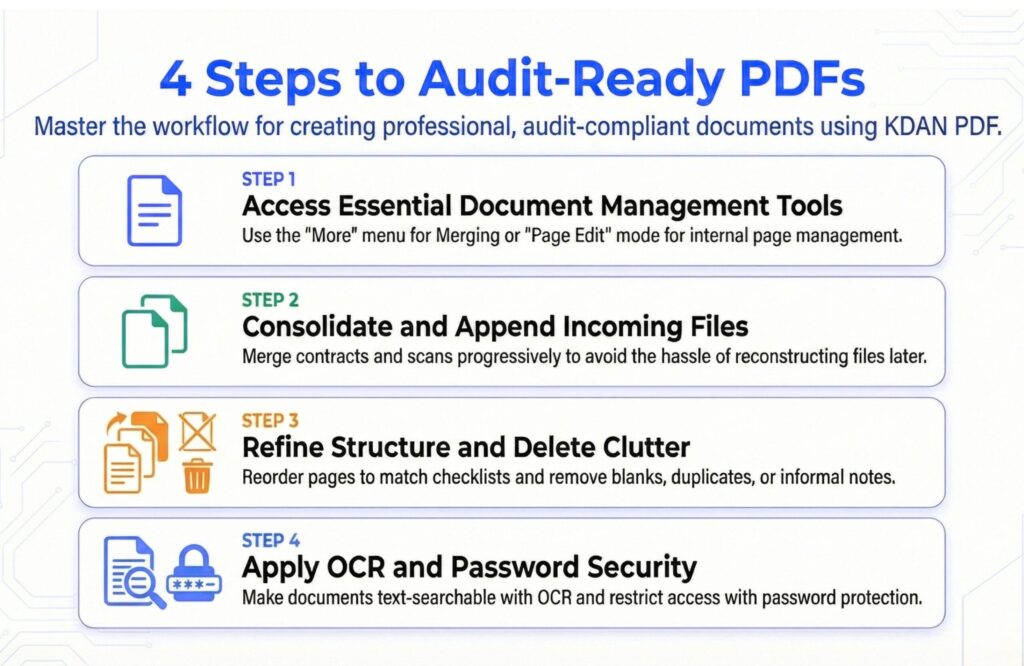
Step 1: Access the necessary management tools. Use the More menu to find the Merge function for combining different files, or enter Page Edit mode to manage pages within a single document.
Step 2: Merge and append incoming documents. As contracts, ID scans, or onboarding forms arrive, use the Merge tool to consolidate them. Building the file progressively is more efficient than reconstructing it later.
Step 3: Rearrange and delete to finalize structure. In Page Edit mode, reorder pages to match your audit checklist. Remove blanks, duplicates, and any informal working notes to maintain a clean record.
Step 4: Run OCR and apply password protection. OCR makes scanned pages text-searchable, while password protection ensures only authorized personnel can access the sensitive information.
Frequently Asked Questions
What documents should be included in an employee personnel file?
A complete file typically includes the offer letter, signed employment contract, ID verification, onboarding forms, payroll documentation, signed policy acknowledgments, and performance reviews. Sensitive records, such as medical information and accommodation requests, should be kept in a separate, access-controlled document.
How do I organize HR documents to be ready for an audit?
Maintain a single master PDF per employee, organized to mirror your audit checklist. Merge new documents as they arrive, rearrange pages to match the required sequence, and run OCR so the file is text-searchable. When an audit request comes in, you produce one complete document rather than reconstructing a record under pressure.
Is it safe to use free online PDF tools for HR documents?
No. Free tools require uploading sensitive employee data to servers you don’t control, and many retain file fragments in temporary storage after the session ends. KDAN PDF’s page management functions run locally on your device, keeping the files you’re consolidating within your controlled environment.
What’s the difference between Adobe Acrobat and KDAN PDF for HR use?
Adobe Acrobat Pro is a comprehensive tool designed for enterprise workflows, priced at $239.88/year. For HR teams whose core needs are merging, splitting, rearranging, and deleting pages, KDAN PDF provides exactly those functions at $59.99/year, with local processing for page management included.
Start Building a More Reliable HR Operation
Every scattered file is a risk. Every disorganized folder is a delay waiting to happen.
The HR teams that move through audits and reviews with confidence aren’t the ones with the most resources; they’re the ones with the most systematic approach. KDAN PDF gives lean teams the tools to build that system: focused, affordable, and designed to keep sensitive documents within your environment where they belong.
Download the KDAN PDF free trial and start building your audit-ready personnel files today.
Try KDAN PDF Free for 7 Days
Consolidate onboarding documents and build audit-ready personnel files with full feature access. Download for free to start your trial—no credit card required.



Connect with KDAN
Follow us to receive all latest updates and promotions.