Features

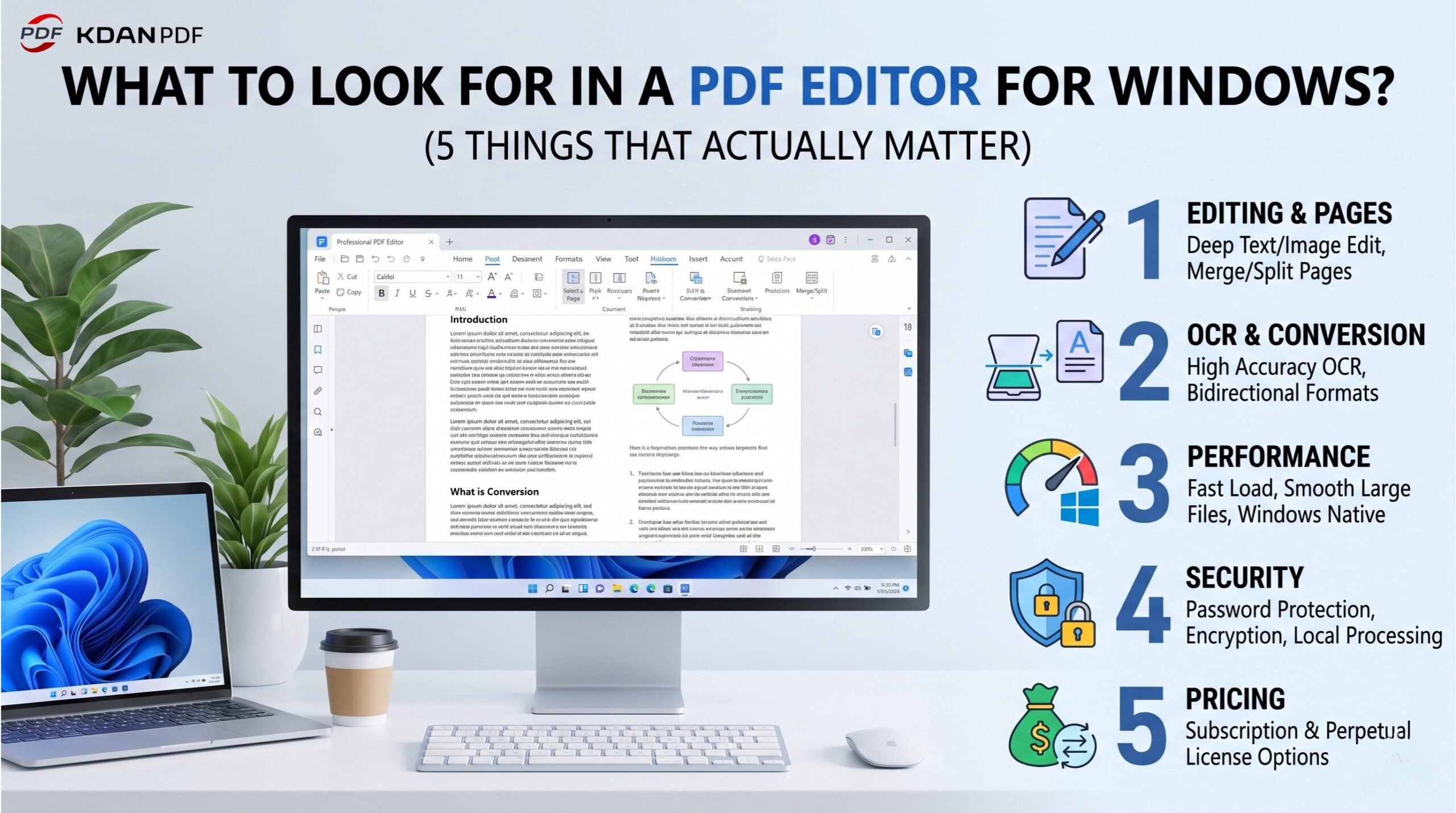
What Should I Look for in a PDF Editor for Windows? (5 Things That Actually Matter)

Choosing a PDF editor for Windows? Evaluate tools across 5 dimensions: editing depth, OCR accuracy, performance, security, and pricing. See how KDAN PDF measures up.

Read more: What Should I Look for in a PDF Editor for Windows? (5 Things That Actually Matter)
Features

Free PDF Editor for Windows: Where the Limits Are (and What to Do Next)

Free PDF editors handle basic annotation and form filling — but watermarks, missing OCR, and privacy risks expose the ceiling fast. This guide maps exactly where free tools stop and when KDAN PDF becomes the smarter investment.

Read more: Free PDF Editor for Windows: Where the Limits Are (and What to Do Next)
Features

Edit PDF on Windows Without Adobe — 4 Methods That Work

Need to edit a PDF on Windows without Adobe? Compare 4 methods — KDAN PDF, Edge, Google Docs, and online tools — and pick the right fit for your task.

Read more: Edit PDF on Windows Without Adobe — 4 Methods That Work
Features

W-4 in No-Tax States vs. High-Tax States: What’s Actually Different?

W-4 state requirements vary significantly between states like Texas and California. Learn how to manage federal and state withholding forms accurately to avoid errors.

Read more: W-4 in No-Tax States vs. High-Tax States: What’s Actually Different?
Features

Do I Need to File a 1099-NEC With My State? A State-by-State Guide

Master 1099-NEC state filing requirements with our guide. Learn about the CF/SF Program and specific rules for California, New York, Texas, and Florida to stay compliant.

Read more: Do I Need to File a 1099-NEC With My State? A State-by-State Guide
Features

How to Fill Out a W-4 in New York: IT-2104 Form Explained

Starting a job in NY? Learn how to fill out a W-4 in New York alongside the IT-2104 form. Understand state allowances, NYC local taxes, and avoid withholding errors.

Read more: How to Fill Out a W-4 in New York: IT-2104 Form Explained
Features

How to Fill Out a W-4 in California: A Guide to the State DE-4 Form

Filling out a W-4 in California requires understanding the DE-4 state form. Learn the differences in tax withholding and how to avoid common filing mistakes today.

Read more: How to Fill Out a W-4 in California: A Guide to the State DE-4 Form
Features

W-9 for Sole Proprietors vs. LLCs: How Business Structure Changes Your Form

Sole proprietor or LLC? Learn how your business structure affects your W-9, which tax ID to use, and what the proposed 2026 IRS changes mean for freelancers.

Read more: W-9 for Sole Proprietors vs. LLCs: How Business Structure Changes Your Form
Features

States With No Income Tax and the W-9: What Freelancers in TX, FL, WA Need to Know

Living in a state with no income tax like TX, FL, WA, or NV? Learn why the W-9 form and 1099-NEC still matter for your federal taxes and how to stay compliant as a freelancer.

Read more: States With No Income Tax and the W-9: What Freelancers in TX, FL, WA Need to Know
Features

Does Windows 11 Have a Built-In PDF Editor? (The Honest Answer)

Windows 11 doesn’t include a real PDF editor — Edge only handles basic annotation. Learn what it can’t do, and find the best PDF editor to install on Windows 11.

Read more: Does Windows 11 Have a Built-In PDF Editor? (The Honest Answer)
Features

How to Fill Out a W-4 Form PDF in 2026: The Complete Guide (Windows, Mac & Mobile)

Confused by IRS Form W-4? Learn how to fill out, calculate, and sign your W-4 PDF using KDAN PDF. Works on Windows, Mac, iOS, and Android—no printing required.

Read more: How to Fill Out a W-4 Form PDF in 2026: The Complete Guide (Windows, Mac & Mobile)
Features

How to Fill Out a W-9 Form PDF in 2026: The AI-Powered, Stress-Free Guide

Struggling with IRS Form W-9? Learn how to fill out, sign, and secure your W-9 form PDF using KDAN PDF Discover AI tools and permanent license options to save time and money.

Read more: How to Fill Out a W-9 Form PDF in 2026: The AI-Powered, Stress-Free Guide
Business

How to Choose a PDF Editor with AI: A Practical Guide for HR & Admin Teams

Handling complex admin and HR documents every day? Which PDF AI tool is the best value? This article compares 6 leading editors – KDAN PDF, Acrobat, Foxit, and more – across translation, form data extraction, and auto-redaction, plus 3 practical file security tips to help you work twice as fast without compromising data protection.

Read more: How to Choose a PDF Editor with AI: A Practical Guide for HR & Admin Teams
Features

Top 10 Must-Have PDF Templates for Small Businesses & Freelancers in 2026

Looking for ready-to-use PDF templates for your business? Explore the top 10 templates for freelancers and SMBs in 2026, complete with billing, agreements, and project management forms.

Read more: Top 10 Must-Have PDF Templates for Small Businesses & Freelancers in 2026
Features

Best PDF Editors for Windows in 2026: Free & Paid Compared

Discover the best PDF editors for Windows in 2026. Compare free and paid tools for editing, OCR, annotation, and business workflows to find the right PDF solution.

Read more: Best PDF Editors for Windows in 2026: Free & Paid Compared
Features

How to Convert Pictures to PDF on iPhone: 3 Easy Methods for Any Situation

Learn how to convert pictures to PDF on your iPhone using the Photos app, online tools, or KDAN PDF. Simple steps for receipts, documents, notes, and more—perfect for quick sharing and organized storage.

Read more: How to Convert Pictures to PDF on iPhone: 3 Easy Methods for Any Situation
Your PDF Workflow Is a Mess — Claude Handles Deleting Pages, Compressing, and Sending in One Conversation Your PDF Workflow Is a Mess — Claude Handles Deleting Pages, Compressing, and Sending in One Conversation
AI News

Your PDF Workflow Is a Mess — Claude Handles Deleting Pages, Compressing, and Sending in One Conversation

Sending one PDF to a vendor shouldn’t mean opening 4 tools and 7 steps — that’s not you being slow, it’s a broken process. This article recreates that weekly scenario and shows how KDAN PDF MCP lets you delete pages, compress, and send in a single Claude conversation, handing off all the steps that don’t really count as work.

Mac’s Fastest PDF Editor? KDAN PDF Gets a Full Upgrade — Three Changes You’ll Notice Right Away Mac’s Fastest PDF Editor? KDAN PDF Gets a Full Upgrade — Three Changes You’ll Notice Right Away
News and Events

Mac’s Fastest PDF Editor? KDAN PDF Gets a Full Upgrade — Three Changes You’ll Notice Right Away

The rendering engine is what makes or breaks a PDF tool’s real-world speed. KDAN PDF for Mac v4.0.1 targets three specific pain points: launch time, large complex file handling, and post-edit layout accuracy. Here’s what changed and who benefits most.

How to Build Professional Reports with NotebookLM and KDAN PDF How to Build Professional Reports with NotebookLM and KDAN PDF
Business

How to Build Professional Reports with NotebookLM and KDAN PDF

In 2026, the challenge isn’t generating content—it’s ensuring it’s client-ready. This guide explores a high-efficiency workflow that bridges the gap between raw research and polished deliverables. Learn how to leverage Google NotebookLM for deep data synthesis, refine your narrative in Google Docs, and use KDAN PDF to handle the “last mile” of professional editing and page management. Stop letting minor export errors undermine your credibility and start delivering flawless reports faster.

How to Organize Onboarding Documents: KDAN PDF vs. Adobe Acrobat How to Organize Onboarding Documents: KDAN PDF vs. Adobe Acrobat
Business

How to Organize Onboarding Documents: KDAN PDF vs. Adobe Acrobat

HR doesn’t have time for document chaos on day one. This article breaks down why KDAN PDF is the most practical Adobe Acrobat alternative for HR teams. Discover 5 essential workflows—from merging files and extracting text via OCR, to redacting sensitive PII—that will help you build secure, compliant personnel records at a fraction of the enterprise cost.

Free PDF Editor for Windows: Where the Limits Are (and What to Do Next) Free PDF Editor for Windows: Where the Limits Are (and What to Do Next)
Features

Free PDF Editor for Windows: Where the Limits Are (and What to Do Next)

Free PDF editors handle basic annotation and form filling — but watermarks, missing OCR, and privacy risks expose the ceiling fast. This guide maps exactly where free tools stop and when KDAN PDF becomes the smarter investment.

View More